
At 1-grid, we know your domain is more than a name; it’s your online identity. That’s why keeping your domain contact information up to date is essential.
Your contact details help verify domain ownership, ensure you receive important renewal and verification notices, and maintain compliance with ICANN’s global domain registration requirements.
This guide explains everything you need to know about updating your domain’s contact details, how ICANN and ZARC verification works, and how to stay compliant and protected.
- Understanding WHOIS Records and Domain Contacts
- What is Domain Contact Information?
- What Is ICANN Verification and Why Does It Matter?
- Understanding RDDS (WHOIS) Verification Requirements
- Understanding ZARC Verification Requirements
- What Is a Change of Registrant and How It Works
- Why Keeping Contact Information Updated Matters
- How to Update Domain Owner Contact Details (via Customer Zone)
- When to Contact 1-grid Domains Support
- FAQs
- Additional Resources
Understanding WHOIS Records and Domain Contacts
Keeping your domain contact information up to date is essential for managing your website, emails, and legal ownership.
Here’s a simple overview of the key roles listed on a domain’s WHOIS record:
Registry
The registry manages the top-level domain (TLD) itself. They set rules, manage registrations, and generate the zone file. Some registries manage multiple TLDs (like ZARC for .co.za and .org.za), while others manage just one (like SIDN for .nl).
Registrar
The registrar acts as the bridge between you and the registry. They are accredited to register domains on your behalf. At 1-grid, we serve as the registrar for several TLDs, including .online, .co.za, and .africa.
Registrant
The registrant is the domain owner; the person or organisation who has the right to use the domain for their website and email, provided the domain fees are paid. If you host your domain with 1-grid, you are the registrant.
Domain Contact Details on WHOIS
WHOIS records list key contacts associated with your domain:
- Registrant Contact: The legal owner of the domain.
- Technical (Tech) Contact: Responsible for technical operations, such as DNS settings.
- Billing Contact: Receives invoices and manages payment for the domain.
Keeping these contacts accurate ensures uninterrupted service, smooth communication, and quick resolution of any domain-related issues.
What is Domain Contact Information?
Your domain contact information includes your name, organisation, email address, phone number, and physical address linked to your domain registration.
It’s used by domain registries and registrars (like 1-grid) to:
- Verify domain ownership.
- Contact you regarding renewals, verifications, or updates.
- Display limited information publicly via the RDDS (Registration Data Directory Service), ZARC or WHOIS lookup (depending on privacy settings).
Keeping this information accurate ensures you remain in full control of your domain and that you receive important notices on time.
What Is ICANN Verification and Why Does It Matter?
The Internet Corporation for Assigned Names and Numbers (ICANN) require all accredited registrars, including 1-grid, to verify the accuracy of registrant email addresses. This can include verification from ZARC for .za extensions.
You may receive a Verification Email when:
- You register a new domain.
- You transfer a domain to 1-grid.
- You update your domain’s email address or contact information.
You must verify your email address by clicking the link in that email.
If you don’t verify within 15 days, your domain may be suspended until verification is complete.
IMPORTANT: Verification protects your ownership, not restricts it. Think of it as a safeguard for your domain identity.
Understanding RDDS (WHOIS) Verification Requirements
The RDDS (Registration Data Directory Service), formerly known as WHOIS, provides public records of domain ownership and contact information.
By law, all registrars must maintain accurate and verified information.
ICANN’s WHOIS Data Reminder Policy (WDRP) requires registrars like 1-grid to:
- Send annual reminders to confirm your contact details.
- Promptly update records when changes are made.
If the information is inaccurate or unverifiable, domains may be suspended or removed from the registry until corrected.
Understanding ZARC Verification Requirements
ZARC (ZA Central Consortium), is a South African organisation that manages internet domain names for the country, including .za second-level domains like .co.za and .org.za, as well as geographical top-level domains for cities like .capetown, .joburg, and .durban.
ZARC domain name verification includes:
- Registrar Accreditation: ZARC also conducts its own verification process for organisations that apply to be ICANN-accredited registrars.
- Domain Registration: Verification is part of the standard process for registering a .za domain, managed through a registrar. For example, if you want to transfer a domain, you must complete the process by verifying the transfer request.
- Technical Verification: ZARC is responsible for the technical verification of domain names and uses the EPP protocols (Extensible Provisioning Protocol) for domain management, ensuring it aligns with international standards.
What Is a Change of Registrant and How It Works
A Change of Registrant occurs when ‘ownership’ details (such as the name, company, or email address) of a domain are updated.
ICANN requires verification for any significant changes to ensure the rightful owner authorises them.
When this happens:
- Both the current and new registrant receive an email.
- Both must approve the change via the verification links.
- The change only takes effect once both parties confirm.
NOTE: If not confirmed within 7 days, the request expires, and no changes are made.
IMPORTANT: This process helps protect your domain from unauthorised transfers or hijacking.
Why Keeping Contact Information Updated Matters
Keeping your contact information accurate ensures that:
- You retain full ownership and control of your domain.
- You receive important renewal, verification, and policy update notifications.
- You comply with ICANN / ZARC requirements.
- You avoid suspension or domain loss due to unverified details.
Keeping contact details current = smooth service, continuous ownership, and no surprises.
How to Update Domain Owner Contact Details (via Customer Zone)
Domain contacts (owner, admin, and tech) can be the same or different for alternative users. Make sure their email addresses are accurate and avoid using email addresses associated with your domain (e.g., [email protected]). We can recommend that you use a reliable third-party email like Gmail.
When registering a new domain or transferring one to 1-grid, we default to using your 1-grid primary Account Profile details.
After registration, you can update this information from your Domains dashboard in your 1-grid Customer Zone.
Step-by-Step Guide:
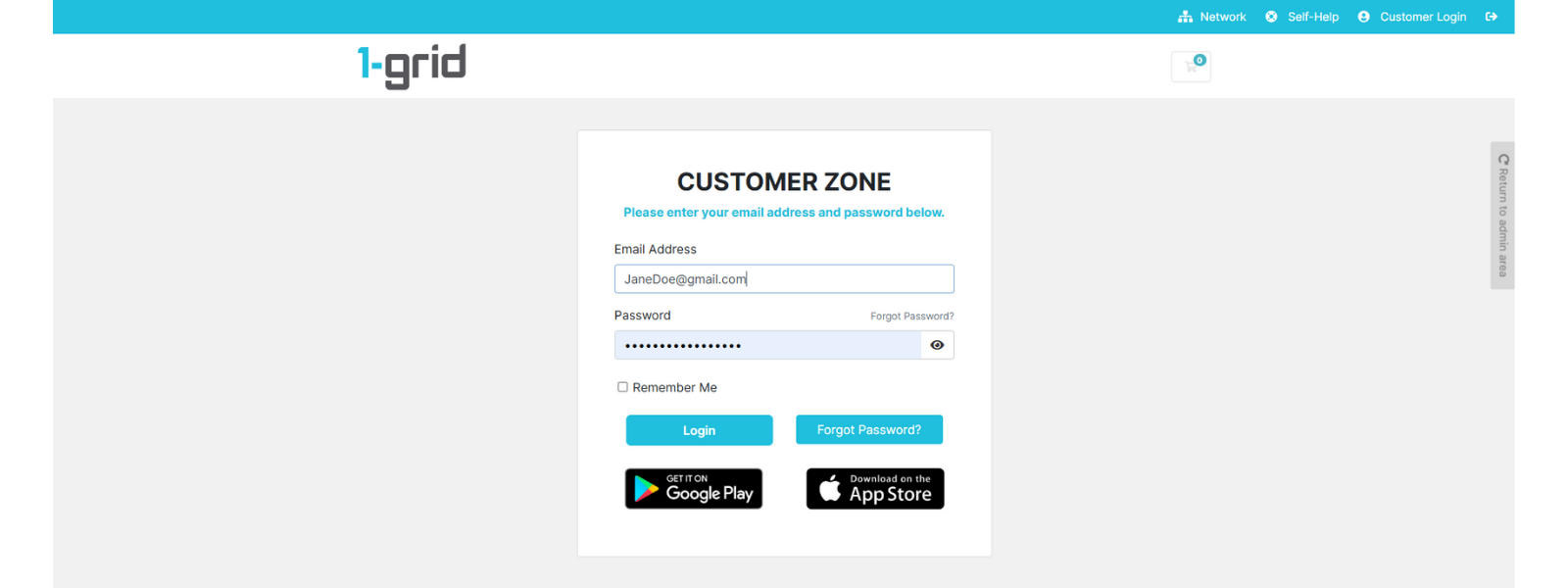
1. Log in to your 1-grid Customer Zone.
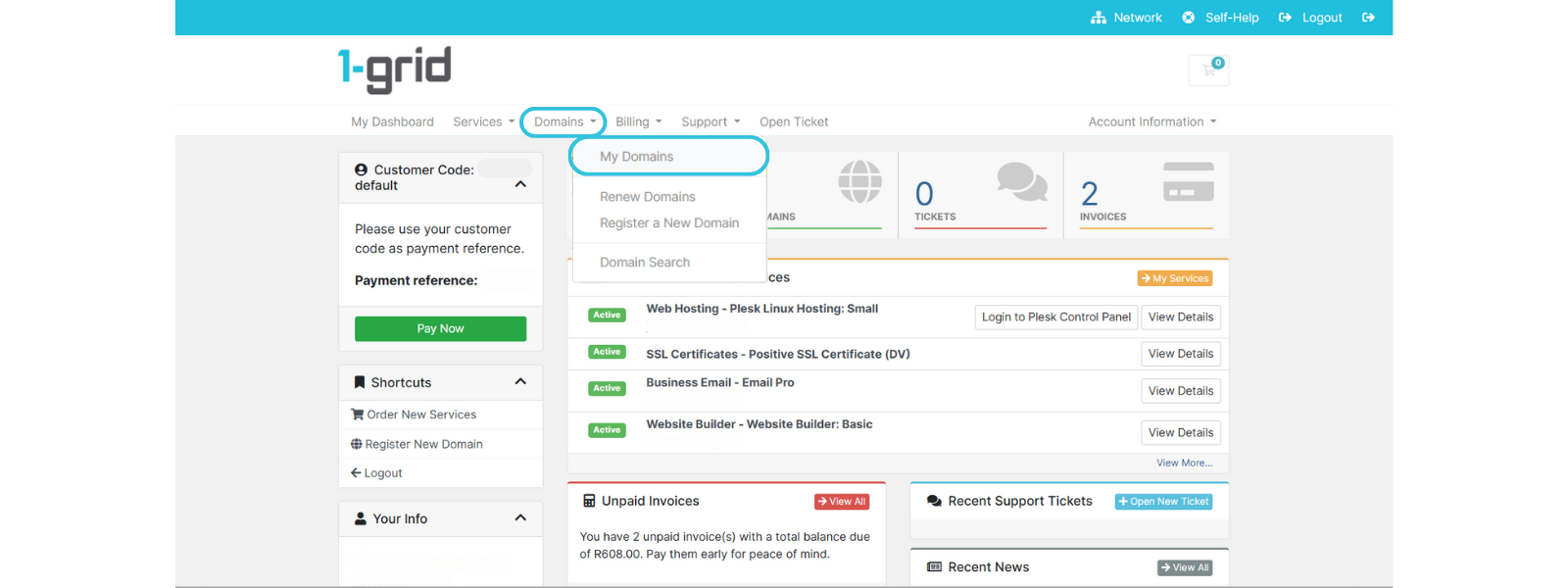
2. Navigate to Domains → My Domains.
3. Select the domain you want to update.
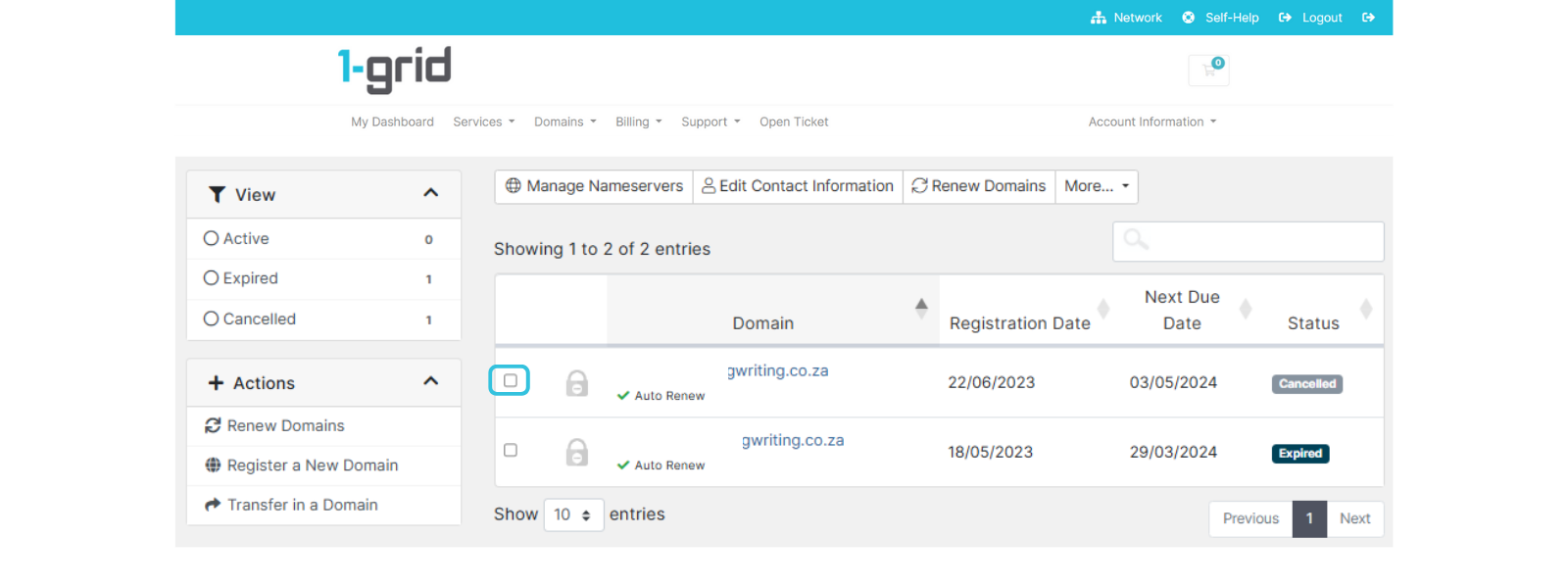
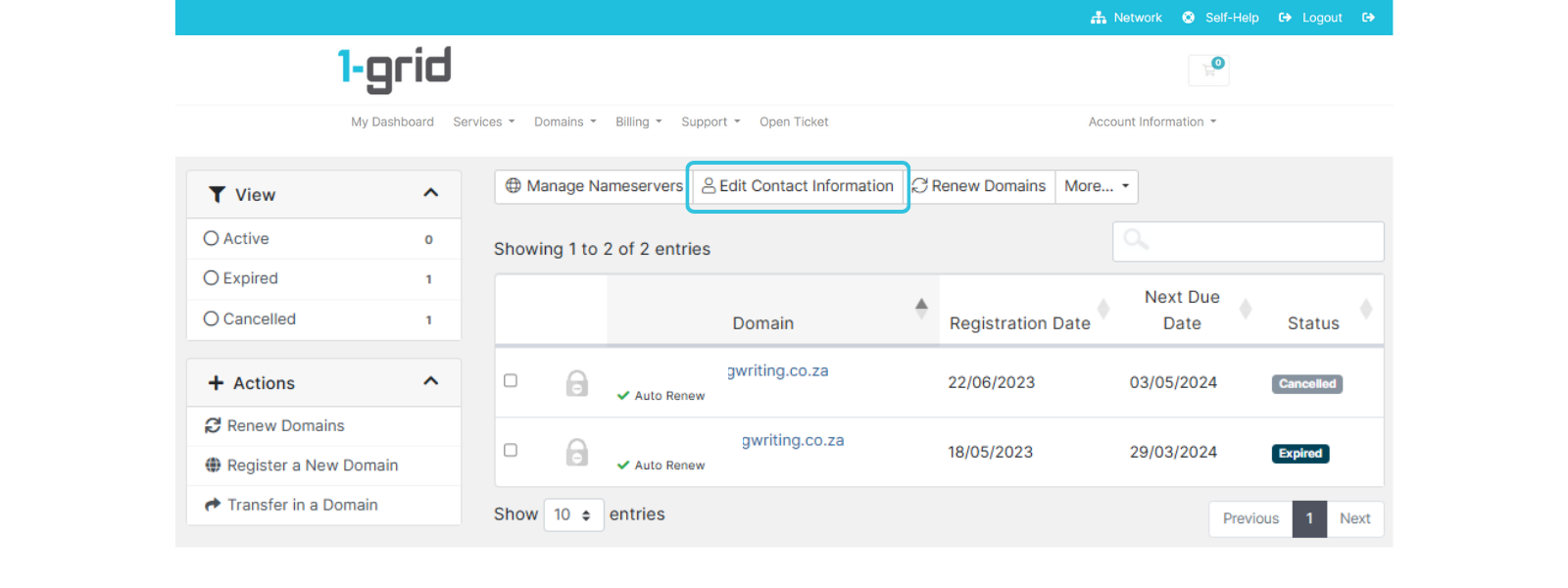
4. Click Edit Contact Information.
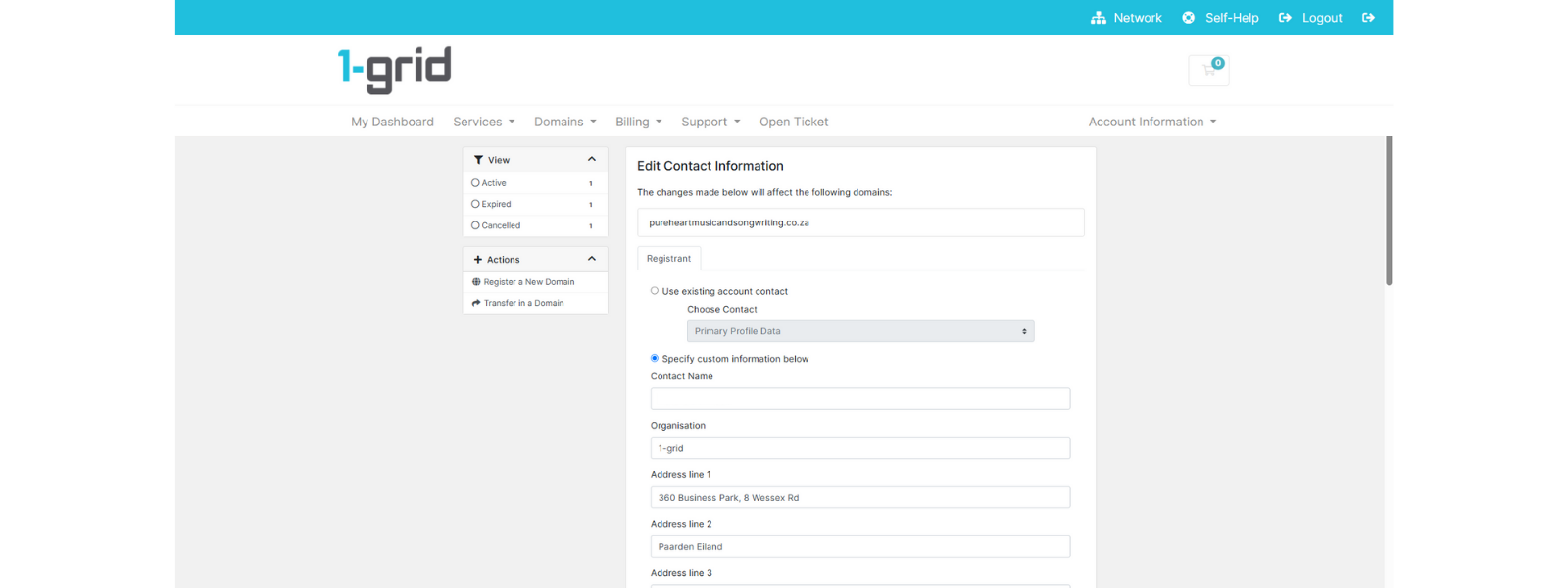
5. Update the relevant details (name, organisation, email, phone, address).
6. Click Save Changes.
7. Watch for a verification email from 1-grid or ICANN/ZARC, then open it and click the link to verify.
Once verified, your contact records are updated globally.
*A 60-day transfer lock may be applied; however, you can confirm the status of this via ZARC WHOIS or ICANN Lookup.
IMPORTANT: Double-check your email inbox (and spam folder) for verification links to avoid unnecessary suspensions.
NOTE: Domain contact information updates take up to 5 working days to take effect for .co.za domains. During this time, you would not be able to make any other changes to the domain, such as nameserver updates. For any other domain, such as .com, you will receive a verification email to accept the changes made. If the information is not verified, the domain will be suspended, which will impact both emails and websites.
When to Contact 1-grid Domains Support
Contact our Team if:
- You haven’t received your verification email after 24 hours.
- Your verification link has expired.
- You cannot access your domain management area.
- You believe your contact details are incorrect, but locked from editing.
TIP: Submit a Support Ticket or email us at [email protected].
FAQs
There’s a notification on my domain that I need to verify, but I haven’t received the email. What should I do?
Check your spam or junk mail folder. If it’s not there, contact 1-grid Support to request a new verification email.
I clicked on the verification link, but it’s expired. What does that mean?
Verification links expire after a short time for security reasons. You’ll need to request a new link by contacting 1-grid Support.
How often do I need to verify my details?
Once verified, your contact information only needs re-verification if it changes (such as your email or organisation name).
What happens if I don’t verify my domain contact information?
Your domain may be temporarily suspended until verification is complete, and your website or email may stop working.
Can I update my contact details anytime?
Yes, you can update them anytime in your Customer Zone, but major ownership changes require ICANN verification.
Additional Resources
Understanding Domain Renewal Invoices at 1-grid
Reasons Why Your Domain Transfer Could Fail
Domain Auto-Renewal Statuses: A Guide
Domains: Renewal Process for Local and International Domains
Need Additional Support?
We’re Here to Help:
Updating your domain contact information or understanding the verification process doesn’t have to feel technical with this easy-to-understand guide. Stuck? Contact our Support Team for clarity and guidance (https://1grid.co.za/contact-us/). We’re ready to see how we can help!