
Our option to pay using credit on your account makes it a simple, secure, and proactive way to stay on top of your payments, and we make it even easier to check your credit balance on your 1-grid account.
By keeping funds in your 1-grid account, you can automatically pay invoices when they’re due, meaning no manual payments, no delays, and no risk of service suspension. It’s an ideal way for you to maintain full control over your billing while enjoying the convenience of automatic renewals and faster processing.
This guide will show you how to check your credit balance directly through your Customer Zone.
- What Is a Credit Balance on Your 1-Grid Account?
- Benefits of Paying with Credit
- How to Check Your Credit Balance on Your 1-grid Account (via Customer Zone)
- Adding Funds as Credit on Your 1-grid Account (via Customer Zone)
- Paying Invoices with Credit on Your 1-grid Account (via Customer Zone)
- When to Contact 1-grid Billing Support
- FAQs
- Additional Resources
- Need Additional Support?
What Is a Credit Balance on Your 1-Grid Account?
A credit balance on your 1-grid account means that funds are preloaded/loaded onto your 1-grid account either by yourself or perhaps as a credit for any overpayment. Use this to pay any future invoices for hosting, email, and domain services, giving you peace of mind while other things need your attention.
Benefits of Paying with Credit
- Instant Payments means no waiting period as future invoices are settled immediately.
- Automatic Renewal Protection prevents downtime or missed renewals.
- Budget-friendly means you can manage expenses proactively by pre-funding your account.
- Convenient means avoiding repeated manual payments for every invoice.
- Flexible means using your credit for any 1-grid service whenever needed.
- Secure gives you peace of mind as payments are handled in your 1-grid Customer Zone.
How to Check Your Credit Balance on Your 1-grid Account (via Customer Zone)
Once you have added funds to your account, it’s easy to keep an eye on this to stay ahead of upcoming invoices for your domains, hosting, and other services. When time is of the essence, we’ve made it simple to stay ahead of the game.
It’s really quick and easy to view your credit balance on your account:
1. Log in to your 1-grid Customer Zone.
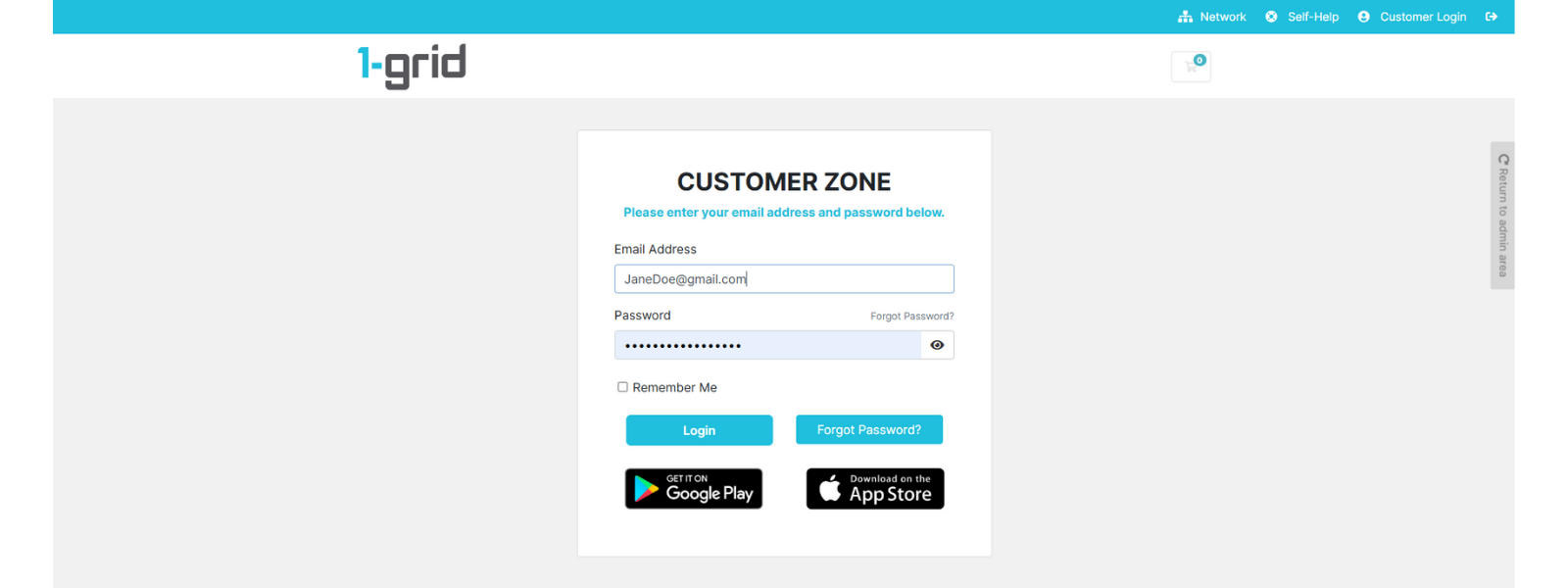
2. Scroll down to the Available Credit section.
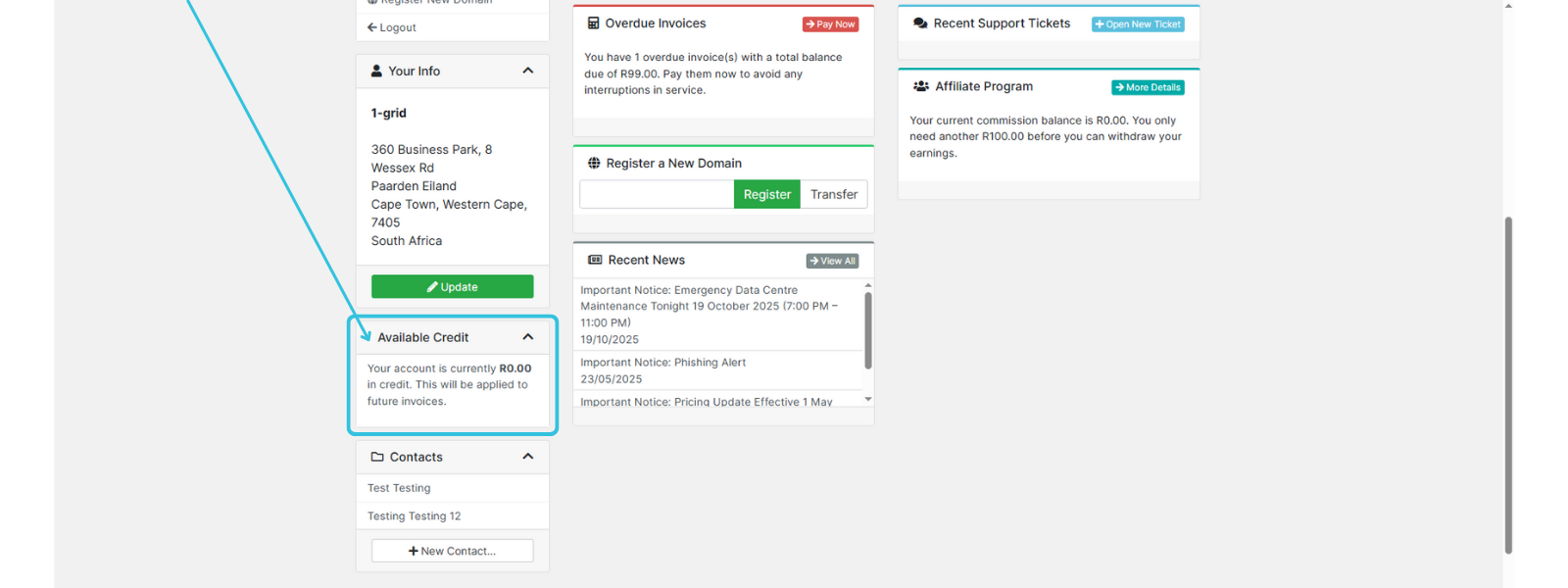
Your credit amount is shown in bold. e.g. R420.00, means this can be used to pay outstanding invoices, for any new services you are ordering or any future invoices.
IMPORTANT: No credit on the account means the amount displayed is R0.00, as it is above.
Adding Funds as Credit on Your 1-grid Account (via Customer Zone)
Adding funds to your account is made simple with our quick guide, so that you can secure payment on any future invoices, so you can focus on your business as a priority!
Paying Invoices with Credit on Your 1-grid Account (via Customer Zone)
Making payment on any of your invoices using your existing or new credit balance is just as easy! View our quick guide on how to do this, and never miss a payment again!
When to Contact 1-grid Billing Support
Contact our Team:
- The credit doesn’t reflect a successful payment.
- You’ve incorrectly applied or deducted an amount.
- You’re struggling to view your credit or cannot see your credit balance.
Include the following:
- Proof of payment, clearly reflecting the date, account number, amount, and reference number (Customer Code).
- Details of the issue you are experiencing.
TIP: This helps 1-grid Billing Support get you back online faster.
FAQs
Can I use credit to pay for any service?
Yes, account credit can be used for all active services such as domains, hosting, and email, and even for payment of any new orders.
How long does it take for credit to reflect?
Payments via Debit Order, PayFast, or Credit Card are instant. Manual EFT payments can take 2 to 3 working days to reflect.
Can I get a refund for unused credit?
Refunds may be processed under specific circumstances; please contact Billing Support for assistance.
Additional Resources
Our Easy-to-Use Payment Methods at 1-grid
Everything You Need to Know About Invoicing at 1-grid
Introducing the 1-grid Android Application
Payment FAQs
Need Additional Support?
We’re Here to Help:
Checking the credit balance on your 1-grid account doesn’t have to feel like a challenge with this easy-to-reference guide. Stuck? Contact our Billing Team for clarity and guidance (https://1grid.co.za/contact-us/). We’re ready to see how we can help!