
At 1-grid, we know how important uninterrupted hosting, email, and domain services are to your business. That’s why we’ve made it simple for paying invoices securely online with credit card through PayFast, using your Visa or Mastercard credit card.
PayFast provides a trusted, encrypted, and verified payment platform that ensures your details remain safe while your payment reflects instantly, keeping your services active without delay.
This guide will walk you through everything you need to know about credit card payments with 1-grid, the benefits of paying using this method, and a step-by-step guide on how to make payment via your Customer Zone.
- What Is a Secure Credit Card Payment via PayFast?
- Benefits of Paying via Secure Credit Card (PayFast)
- Why Debit Order Is the Recommended and Preferred Option
- How to Update Your Payment Method via the Customer Zone
- How to Pay Your Invoice with Secure Credit Card via Customer Zone
- Security and Transparency
- When to Contact 1-grid Billing Support
- FAQs
- Additional Resources
What Is a Secure Credit Card Payment via PayFast?
A secure credit card payment via PayFast allows you to pay for your hosting, domains, or email renewals directly online without logging into your bank.
PayFast uses 3D Secure technology, which is a multi-layered authentication process required by major banks to ensure that only the cardholder can authorise the payment. This protects your financial data and gives you complete control over every transaction.
Key Features of PayFast Secure Payments:
- Bank-level security using SSL encryption and fraud detection.
- Instant payment confirmation, ensuring no service downtime.
- No extra fees, so you pay only the invoice amount.
- Compatibility with all major South African banks and card providers.
Benefits of Paying via Secure Credit Card (PayFast)
Using PayFast for your payments offers several advantages for busy professionals and small business owners:
Instant Processing
- Payments clear in real-time, ensuring uninterrupted service.
Enhanced Security
- 3D Secure authentication verifies transactions directly with your bank.
Convenience
- No need for manual bank transfers or proof of payment emails.
Professional Reliability
- Perfect for customers who prefer managing payments online at their convenience.
Automatic Receipts
- You’ll receive an instant confirmation email once payment is processed.
Why Debit Order Is the Recommended and Preferred Option
While paying your invoices with credit card through PayFast is quick and reliable, debit order remains the most recommended method for recurring services like hosting, domain renewals, and business email accounts.
It’s more than just convenient; it’s a smart, secure, and stress-free way to keep your services active while simplifying your billing, and building trust, reliability, and financial confidence.
How to Update Your Payment Method via the Customer Zone
Follow these simple steps to update your payment method:
1. Log in to your 1-grid Customer Zone.
2. Click on Update in the Your Info section.
3. Select PayFast Secure Credit Card under Payment Method in your My Details section.
4. Click on Save Changes.
How to Pay Your Invoice with Secure Credit Card via Customer Zone
To make a quick credit card payment using Secure Credit Card via PayFast:
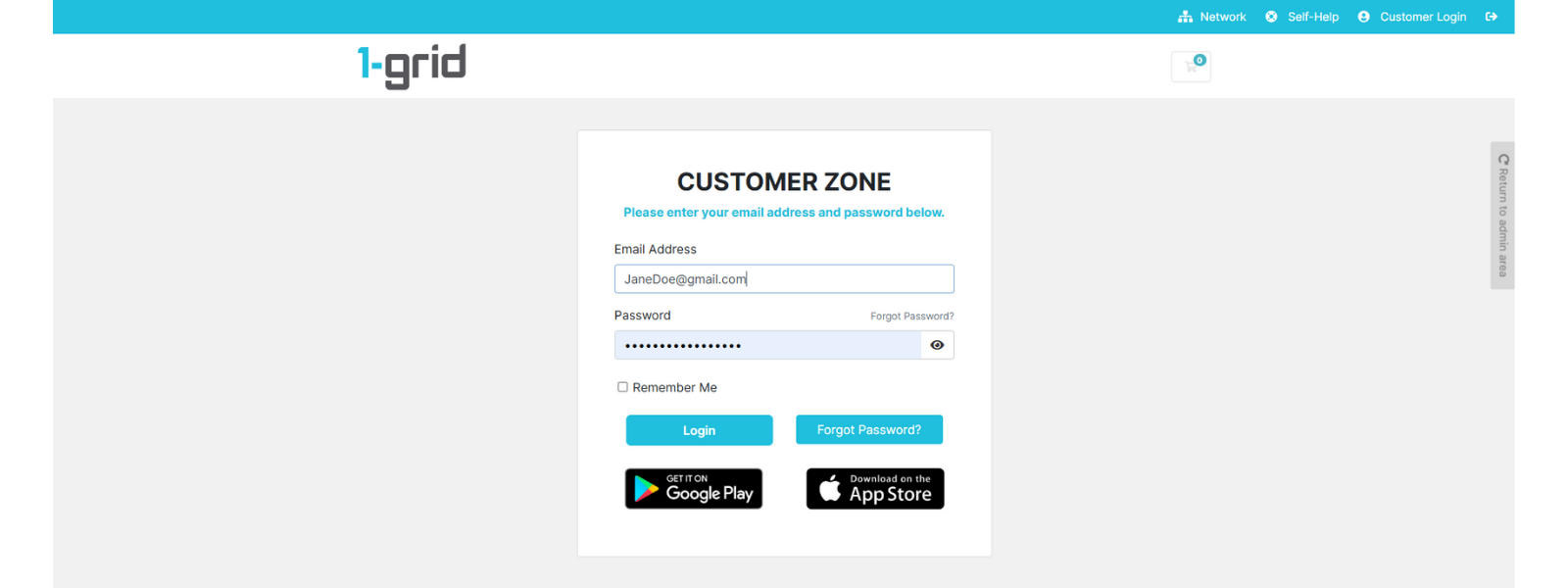
1. Log in to your 1-grid Customer Zone.
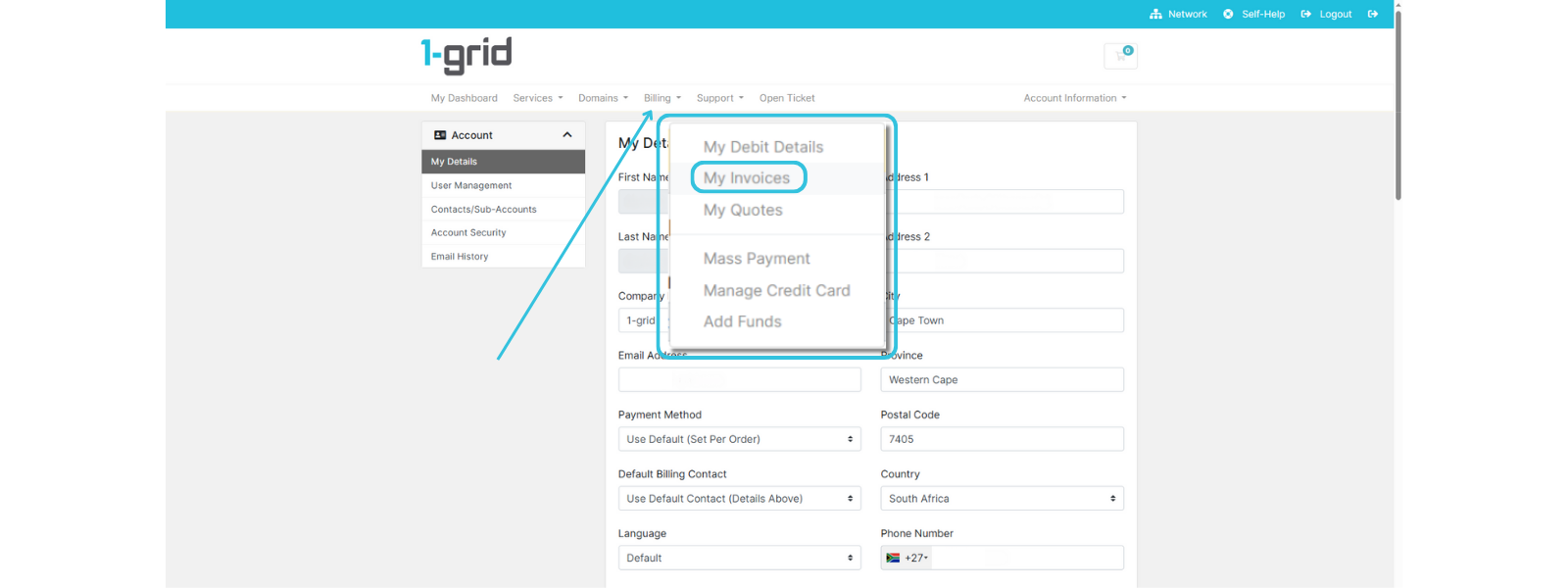
2. Click on Billing → My Invoices.
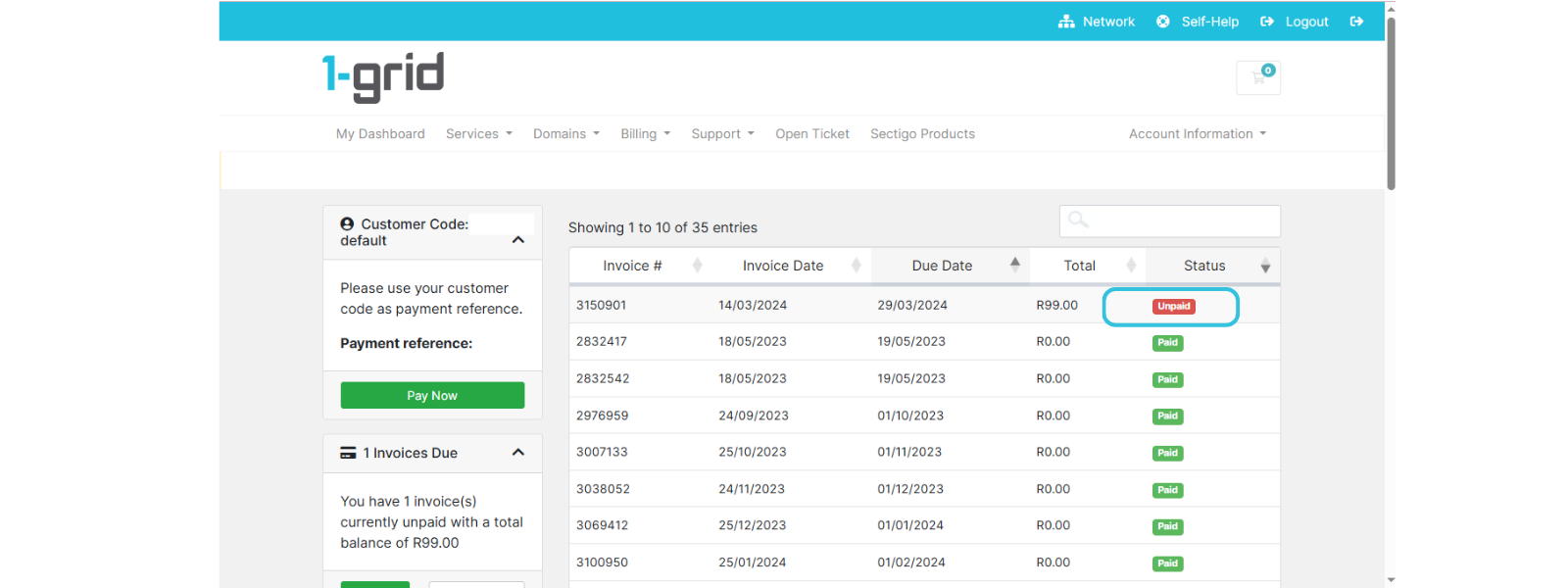
3. Locate the Unpaid invoice and click on it to open it.
4. Make sure that PayFast Secure Credit Card is selected under Payment Method and click Subscribe Using PayFast.
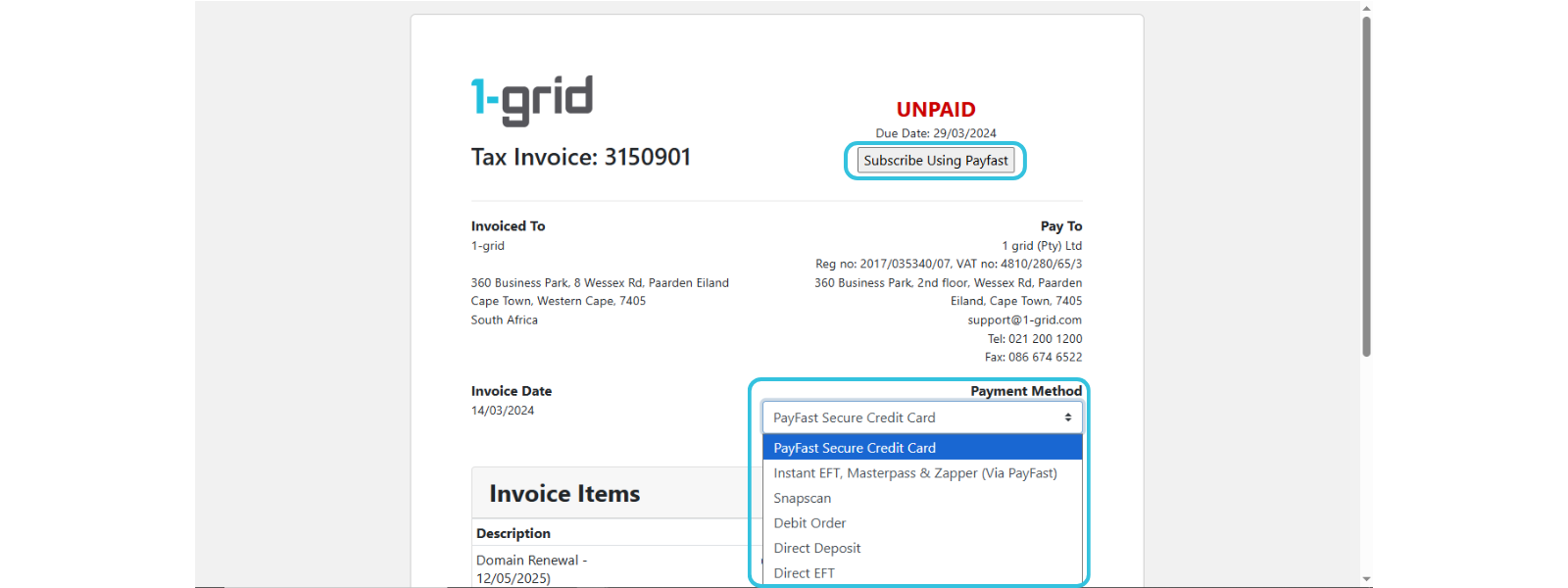
6. You’ll be redirected to the secure PayFast portal.
7. Enter your credit card details and follow the 3D Secure prompts.
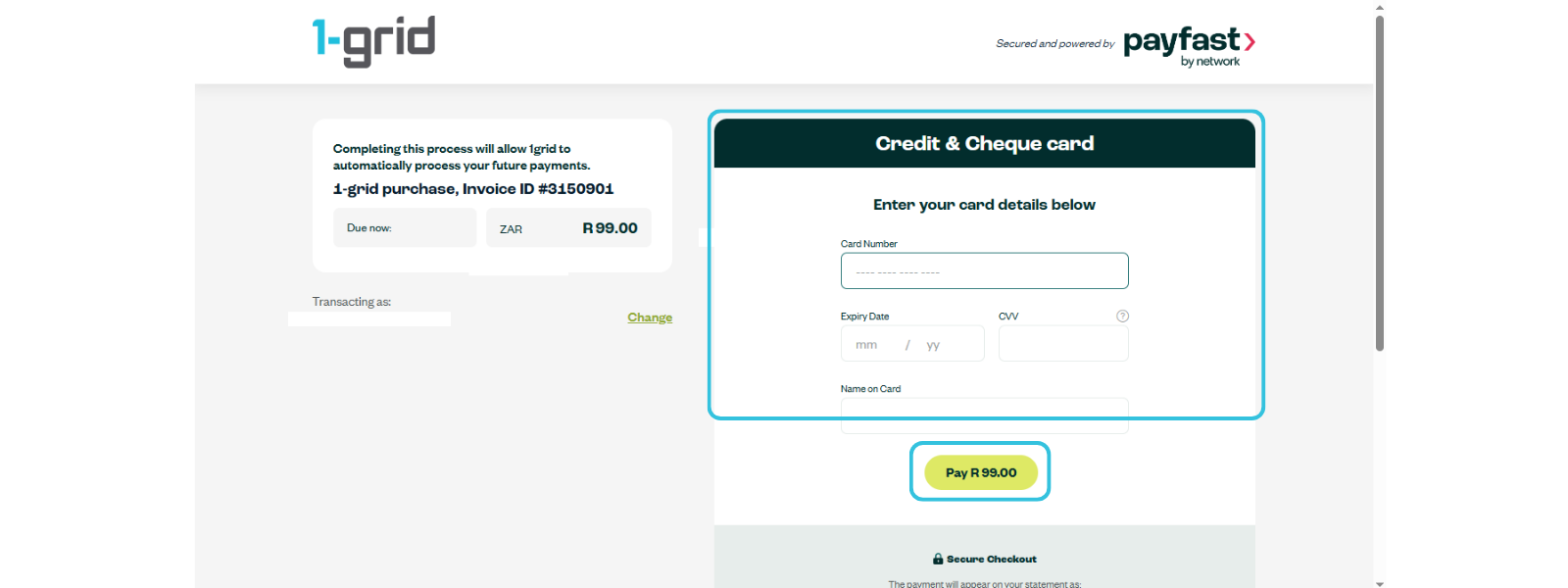
8. *If you have previously completed 5 to 7, you can select Recurring Payment.
9. Once completed, you’ll receive instant payment confirmation via email.
Your account will be updated immediately once you have completed paying your invoice with credit card, and your services will remain active.
TIP: Always double-check that your account has sufficient funds to avoid failed transactions or service suspensions.
Security and Transparency
To protect your account further:
- Ensure your card is activated for online payments.
- Always verify you are on the secure PayFast domain (https://payment.payfast.io/eng/process/payment/) before entering any information.
When to Contact 1-grid Billing Support
Contact our Team:
- You’ve contacted your bank to troubleshoot issues on their end.
- Your card payment failed, but funds were deducted.
- You want help switching from PayFast to Debit Order after attempting to switch on your end.
Include the following:
- Proof of payment, clearly reflecting the date, account number, amount, and reference number (Customer Code).
- Screenshot of any error message you are receiving when trying to pay via PayFast’s portal.
TIP: This helps 1-grid Billing Support get you back online faster.
FAQs
Is PayFast safe for online payments?
Yes, PayFast uses secure SSL encryption and 3D Secure verification to ensure your payment details remain protected.
Can I save my credit card for future use?
Yes, you can securely save your card on PayFast for faster future payments by selecting “Recurring Payment” once you have signed up for payment via Credit Card.
How soon will my payment reflect?
Payments made via PayFast are reflected immediately, ensuring no service interruption.
Can I still pay via Debit Order instead?
Yes, Debit Order remains our preferred payment option for convenience and reliability. You can update this anytime in your Customer Zone.
What should I do if my credit card payment fails?
Check your available funds, verify that your card supports online transactions, or contact your bank. If the issue persists, reach out to [email protected].
Additional Resources
Everything You Need to Know About Debit Orders at 1-grid
Our Easy-to-Use Payment Methods at 1-grid
Services Still Suspended After Payment
Invoicing at 1-grid
The 1-grid Android Application
Need Additional Support?
We’re Here to Help:
Paying your invoices with a secure credit card via PayFast for your services doesn’t have to cause worry with this easy-to-reference guide. Stuck? Contact our Billing Team for clarity and guidance (https://1grid.co.za/contact-us/). We’re ready to see how we can help!