
At 1-grid, we want to resolve your queries as quickly and smoothly as possible. This means that sometimes tickets close automatically if we don’t hear back from you. That’s why it’s important to understand why your Support Ticket closed and how the process works.

How the Ticket Lifecycle Works
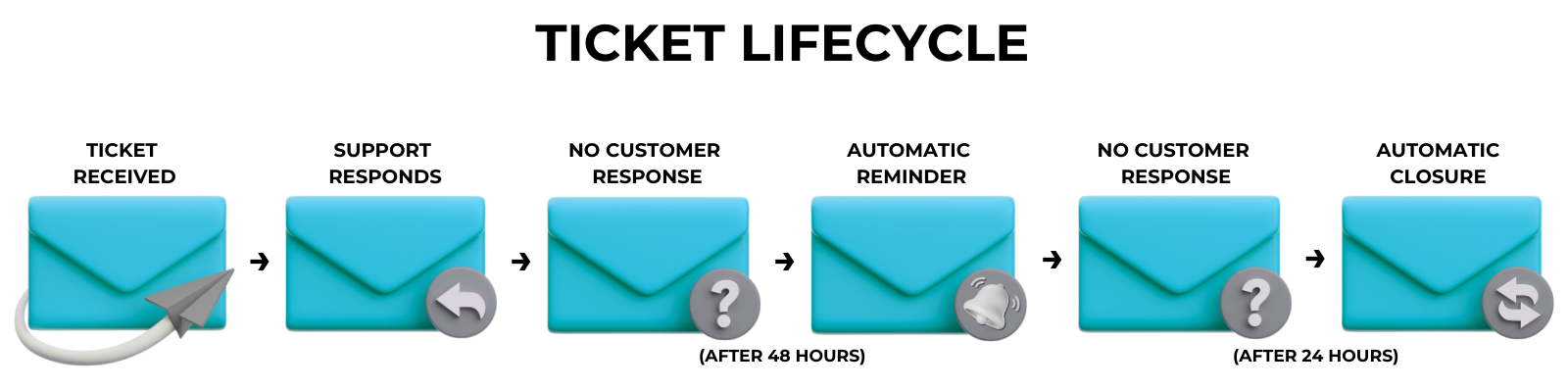
1. When you log a ticket with our Support Team, it will reflect on our system as Open. (You can view your logged Support Tickets in your 1-grid Customer Zone.)
2. You will then receive an automated notification letting you know we have received your request, and you will be provided with a ticket number for your reference.
3. When we respond to your ticket with a proposed solution that requires your confirmation or testing, or when we request more information to assist you further, we mark the ticket as Waiting on Customer Feedback.
4. If we don’t hear back from you within 48 hours, we’ll send you a reminder email.
5. If you don’t respond within 24 hours, the system automatically marks the ticket as Closed.
What “Closed” Really Means
A closed ticket doesn’t mean we can’t help anymore. It simply means:
- We didn’t hear back in time to keep the ticket open.
- We assume your issue may be resolved.
- You can still follow up anytime.
How to Reopen a Ticket
1. Log in to your Customer Zone.
2. Go to Support → Tickets.
3. Go to This ticket has been Closed, then Submit a Reply.
4. Or go to Open Ticket, then Submit a New Ticket.
IMPORTANT: If you are struggling to reopen your previous ticket, you can email the Support Team directly, which will automatically generate a new ticket number, and you will receive this via email, as normal.
Your new ticket will then be viewable through your Customer Zone.
FAQs
What if I didn’t see the reminder email?
You can still create a new one anytime through your Customer Zone or by emailing the relevant Team directly.
For Billing Queries: [email protected]
For Standard Hosting Support Queries: [email protected]
Can I provide feedback after the ticket is closed?
Yes, your feedback response will create a new ticket for our Support Team and will automatically be linked to the previous ticket for ease of reference.
It is important to note that this will, however, create a new ticket number, so when you follow up with our Support Team by call or chat, make sure to provide them with both ticket numbers.
This makes it easier for them to find both and gain a clearer understanding of the issue and the progress.
Why do tickets close automatically?
It helps us keep the support queue efficient and focused on active queries, but you’re never locked out of getting help.
Additional Resources
Viewing Your Logged Support Tickets in Your 1-grid Customer Zone
How to Verify Your 1-grid Account for Support
How to Keep Your 1-grid Account Details Up to Date
Adding a Sub-Account or Technical Contact to Your 1-grid Account
Deleting a Sub-Account or Technical Contact from Your 1-grid Account
Preventing Unauthorised Customers from Accessing 1-grid Support
Need Additional Support?
We’re Here to Help:
Understanding why your ticket has been closed when you feel your query has not been addressed doesn’t have to be confusing, so this easy-to-understand guide makes it easy. Stuck? Contact our Support Team for help (https://1grid.co.za/contact-us/). We’re ready to see how we can help!