
Gmail and other providers use strict filters to protect users from spam. Unfortunately, even legitimate emails can be flagged or blocked. Most email delivery issues, like bounce back and spam issues, can be avoided with correct authentication, clean sending practices, and proper domain configuration.
This guide helps you understand why it happens and how to fix it. By following these steps, you can dramatically improve your email reputation, avoid Gmail blocks, and ensure that your messages reach inboxes instead of spam folders.

Why Emails Land in Spam or Bounce
- Gmail applies reputation and authentication checks.
- Missing or misconfigured DNS records (SPF, DKIM, DMARC).
- Bulk emails are sent to invalid or unverified recipients.
- Suspicious message content (keywords, attachments).
3 Common Gmail Errors
Several errors may happen when sending to Gmail accounts, but we’ve highlighted the top 4 common issues, and we also have a quick guide to help you troubleshoot some of these.
“Message Blocked”
Gmail flagged your domain as suspicious.
“550-5.7.1 detected unusual spam-like activity”
Reputation issue.
“421-4.7.28 does not meet IPv6 guidelines”
DNS / IPv6 misconfigurations.
“451 4.7.0 Temporary rate limit exceeded”
Gmail is throttling message volume.
Resolving a “550-5.7.26 This message does not pass authentication checks” Error
This bounce-back Gmail error message means your email is blocked because it lacks proper authentication, specifically SPF, DKIM, and DMARC records for your domain. To fix this, you must add these DNS records to prove your domain is legitimate and authorised to send emails, preventing your messages from being marked as spam or rejected by Gmail.
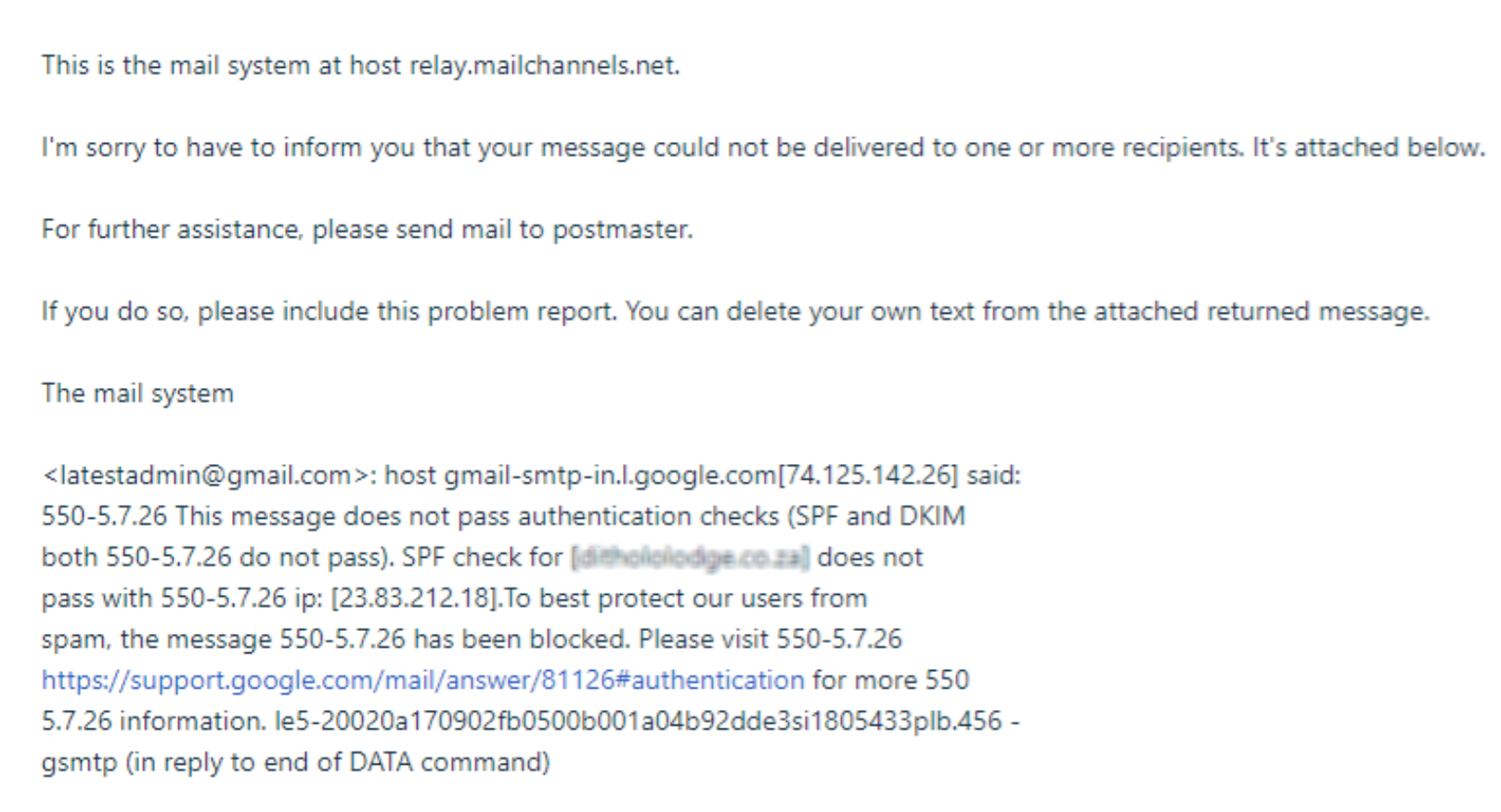
Here are some steps below for updating the TXT (SPF) record to prevent this error message in future when sending to a Gmail account.
1. Log in to cPanel.
2. Click on Zone Editor.

3. Click on Manage.

4. Click on TXT.

5. Click on Edit on the SPF record.

6. Enter the standard record ( v=spf1 include:relay.mailchannels.net ~all ) and click on Save Record.

NOTE: This will enforce Gmail updates not affecting the records, causing emails to bounce back when sending to Gmail accounts. The same applies to the DKIM record and DMARC record.
Prevention Steps
1: Authenticate Your Domain
- SPF: Defines which servers can send on behalf of your domain.
- DKIM: Adds a cryptographic signature to verify messages.
- DMARC: Tells receiving servers how to handle unauthenticated mail.
2: Follow Sending Best Practices
- Send only to verified, opt-in recipients.
- Avoid “spammy” subjects (FREE, $$$, URGENT).
- Don’t send bulk mail without proper list management tools.
- Keep your mailing lists clean and updated.
3: Test and Monitor
- Run messages through mail-tester.com.
- Set up Google Postmaster Tools for Gmail deliverability feedback.
- Monitor DMARC reports regularly.
When to Contact 1-grid Support
Reach out if:
- Emails still bounce after SPF/DKIM/DMARC are configured.
- Gmail continues to flag your domain.
- MailChannels block notices persist after following best practices.
Be sure to provide:
- Troubleshooting steps that you have taken.
- Screenshots of the error message you are getting.
- Confirm if any changes have been made to your DNS records.
FAQs
Will enabling SPF, DKIM, and DMARC stop all bounce-backs?
While they dramatically improve deliverability to assist in preventing bounce back and spam issues when sending to Gmail, Gmail also checks content and reputation.
Why do my emails land in spam only with Gmail?
Gmail has stricter filters than most providers. Test your domain with Google Postmaster Tools.
Do I need all three records: SPF, DKIM, and DMARC?
Yes, using all three provides the strongest authentication and protection.
How often should I review my DNS records?
At least once a year, or whenever you add new email services.
Can 1-grid remove my domain from Gmail’s blocklist?
We can see how we can assist with the investigation, but Gmail controls its own blocklists.
Additional Resources
Resolving Email Error Messages When Sending to Gmail Accounts
Top 10 Common Email Issues and How to Resolve Them
Basic Troubleshooting Steps for Email
Settings to Configure Your 1-grid Email Accounts Across Devices
How to Enable DKIM and SPF on Your Mail Domain
Setting Up Email in Outlook via Windows Control Panel
How to Set Up Email on Android for Your 1-grid Email Accounts
What Is Email Spoofing? How It Works and How to Protect Yourself
How to Spot a Scam Email
Email Headers FAQs
Email FAQs
Why SSL? The Purpose of Using SSL Certificates
What is a Domain Name Server (DNS)?
How to Update Your Domain’s Nameservers at 1-grid
MailChannels FAQs
SpamTitan FAQs
Need Additional Support?
We’re Here to Help:
Preventing bounce back or spam issues when sending to Gmail doesn’t have to be tricky with this easy-to-reference guide. Stuck? Contact our Support Team for clarity and guidance (https://1grid.co.za/contact-us/). We’re ready to see how we can help!