
Phishing remains one of the most common and deceptive online threats, a tactic that preys on trust and quick reactions.
In this guide, we’ll explain what phishing is, how these scams work, and how to protect yourself and your business from falling victim.
- What Is a Phishing Attack?
- Spoofing vs. Phishing: What’s the Difference?
- How Is Phishing Carried Out?
- How Are Phishing Emails Caught or Blocked?
- How Does Phishing Fit into Larger Attack Campaigns?
- What Is Spear Phishing?
- What Is Clone Phishing?
- What Is Whaling?
- Phishing Across Multiple Channels
- How You Can Check If It’s Phishing through Email Spoofing
- How to Protect Yourself from Phishing
- What to Do If You Become Suspicious
- Helpful Tools to Detect or Report Phishing
- Best Practices and Ongoing Maintenance
- FAQs
- Additional Resources
What Is a Phishing Attack?
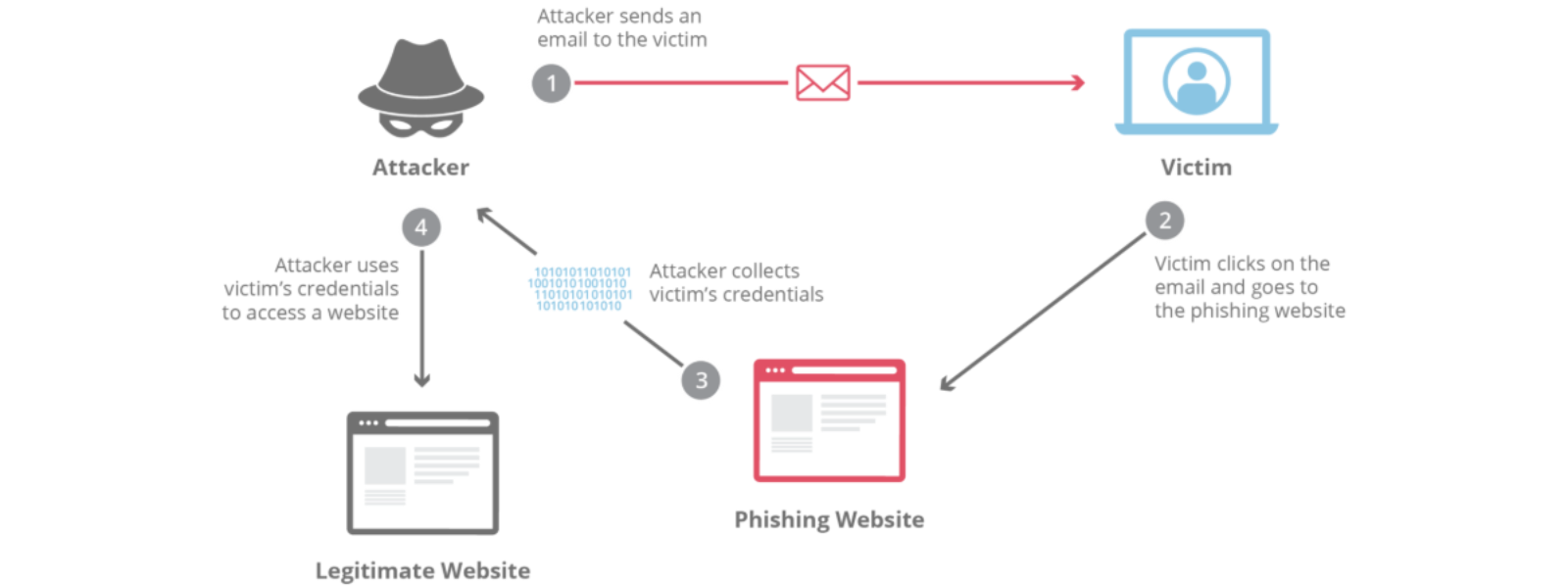
This is a form of cyberattack where attackers disguise themselves as trustworthy sources to trick people into revealing personal or financial information in an attempt to steal sensitive information, typically in the form of usernames, passwords, credit card numbers, bank account information, or other important data, in order to utilise or sell the stolen information.
They usually pretend to be banks, service providers, or even familiar brands (like 1-grid) to get you to click a link, download an attachment, or share sensitive data.
Example: You receive an email that looks like it’s from us saying your payment failed, but the link leads to a fake login page.
IMPORTANT: This can happen through email, SMS (smishing), voice calls (vishing), or even social media messages.
Spoofing vs. Phishing: What’s the Difference?
- Spoofing is the act of forging the sender’s identity.
- Phishing uses deceptive emails (often spoofed) to trick you into revealing sensitive data (passwords, bank details).
While all phishing emails may involve spoofing, not all spoofed emails are phishing, as some may just mimic identity without a direct scam.
How Is Phishing Carried Out?
hishing attacks rely on social engineering, which is a means of manipulating human emotion to bypass technical safeguards.
Attackers commonly:
- Send fake emails with legitimate-looking logos and addresses.
- Use urgent messages to create panic (“Your account will be closed in 24 hours!”).
- Redirect victims to lookalike websites.
- Attach malicious files disguised as invoices or receipts.
- Finding, purchasing, or scraping known contact information.
- Using techniques like DNS fast fluxing to disguise their hosting servers.
At 1-grid, we do our best to safeguard you from these attacks by encouraging you to make sure that you check that they are coming directly from us by checking your email headers.
How Are Phishing Emails Caught or Blocked?
Receiving servers and email providers use authentication protocols and filters to flag or block spoofed emails sent as part of the attack.
- SPF (Sender Policy Framework): Checks if the sending server is allowed for the domain.
- DKIM (DomainKeys Identified Mail): Validates cryptographic signatures on outgoing messages.
- DMARC: Allows domain owners to instruct how recipients handle failed SPF/DKIM checks.
Even with these, some spoofed emails may bypass protection, especially in cases like forwarding or advanced attacks.
How Does Phishing Fit into Larger Attack Campaigns?
This is often the first step in a larger attack, used to gain login details or access-sensitive systems.
Once attackers obtain credentials, they can:
- Compromise business accounts.
- Send more attacks from trusted addresses.
- Deploy ransomware or steal payment information.
This creates a chain reaction, which is why recognising and stopping it early is essential to protecting your digital identity.
What Is Spear Phishing?
Spear phishing targets specific individuals or organisations rather than the general public.
Attackers research their targets, referencing real names, job titles, or company details to sound convincing.
Example: A fake “CEO email” was sent to an employee requesting an urgent fund transfer.
What Is Clone Phishing?
Clone phishing occurs when attackers duplicate a legitimate email. For example, they duplicate a genuine invoice and resend it with a malicious link or attachment.
Because it looks identical to something you’ve seen before, it’s easier to fall for.
What Is Whaling?
Whaling is a type of spear phishing aimed at high-level executives or decision-makers (the “big fish”).
These attacks often involve impersonating legal or financial institutions to request sensitive business data or transfers.
Phishing Across Multiple Channels
This doesn’t only happen via email anymore.
Attackers use:
- SMS (Smishing): Text messages with fake delivery or payment links.
- Voice Calls (Vishing): Impersonating banks or service providers over the phone.
TIP: Always verify through an official website or support channel before acting on any message.

How You Can Check If It’s Phishing through Email Spoofing
- View full email headers where you can look at Received lines, Return-Path.
- Compare the “From” domain to what’s authenticated by SPF/DKIM.
- Hover over links to check if they point to the correct domain.
- Be cautious if the email has urgent requests, unfamiliar links, or mismatched details.
How to Protect Yourself from Phishing
- Check the sender’s domain via their email headers (legitimate emails come from verified addresses).
- Hover over links before clicking and make sure they match the real website.
- Look for grammar or formatting mistakes (common red flags).
- Keep your software, browsers, and antivirus updated.
- Enable SPF, DKIM, and DMARC to protect your own domain.
What to Do If You Become Suspicious
- Don’t click any links or download attachments.
- Forward the email to 1-grid Support for analysis.
- Block the sender or mark as spam.
- If it appears from a trusted contact, verify via alternative means (call, SMS).
Helpful Tools to Detect or Report Phishing
- DNSChecker Email Header Analyser
- MxToolbox Email Header Analyser
- Sendmarc Email Header Analysis Tool
- Google Message Header Tool
Best Practices and Ongoing Maintenance
- Rotate DKIM keys periodically
- Tighten SPF to include only the necessary sending servers
- Update and clean DNS records periodically
- Educate your team and end-users on spotting spoofing attempts
- Use monitoring tools or alerts on DMARC reports
FAQs
What should I do if I clicked on a phishing link?
Disconnect from the internet, change your passwords immediately, and scan your device for malware, then report it to your IT Support or ISP.
Can phishing happen through social media?
Yes. Attackers use fake profiles, links, and messages to steal credentials or install malware.
How can I protect my business from phishing?
Use domain authentication (SPF, DKIM, DMARC), train employees, and secure all logins with multi-factor authentication.
Who can I contact if I receive a phishing email pretending to be from 1-grid?
Forward it to [email protected] so that our team can investigate and guide you on the next steps.
Can I stop spoofers from using my domain completely?
Unfortunately, spoofers can try to forge any domain. But by publishing correct SPF, DKIM, and DMARC records, you can ensure recipient mail servers reject or quarantine fraudulent messages.
Additional Resources
How Do I Prevent Email Spoofing Attacks?
How to Spot a Scam Email
Email Headers FAQs
How to Enable DKIM and SPF on Your Mail Domain
Why SSL? The Purpose of Using SSL Certificates
Settings to Configure Your 1-grid Email Accounts Across Devices
What is a Domain Name Server (DNS)?
MailChannels FAQs
SpamTitan FAQs
Need Additional Support?
We’re Here to Help:
Protecting yourself, your business, emails, and domain against phishing and spoofing doesn’t have to cause you to worry with this easy-to-reference guide. Stuck? Contact our Support Team for guidance (https://1grid.co.za/contact-us/). We’re ready to see how we can help!