
If you host a website, manage email, or rely on online services, RAID (Redundant Array of Independent Disks) is one of the behind-the-scenes technologies that helps protect your data from hardware failures and improves performance.
Instead of relying on a single drive, RAID spreads or duplicates data across several drives so that if one drive fails, your service doesn’t immediately go offline. This means RAID uses multiple hard drives together yet treats them as one system for availability, reliability, and performance over complexity.
This guide will help you understand how RAID works and why it plays an important role in keeping your data available and your Dedicated Server services running smoothly.
How RAID Works
RAID works by combining drives and managing how data is written to them. This can happen in different ways:
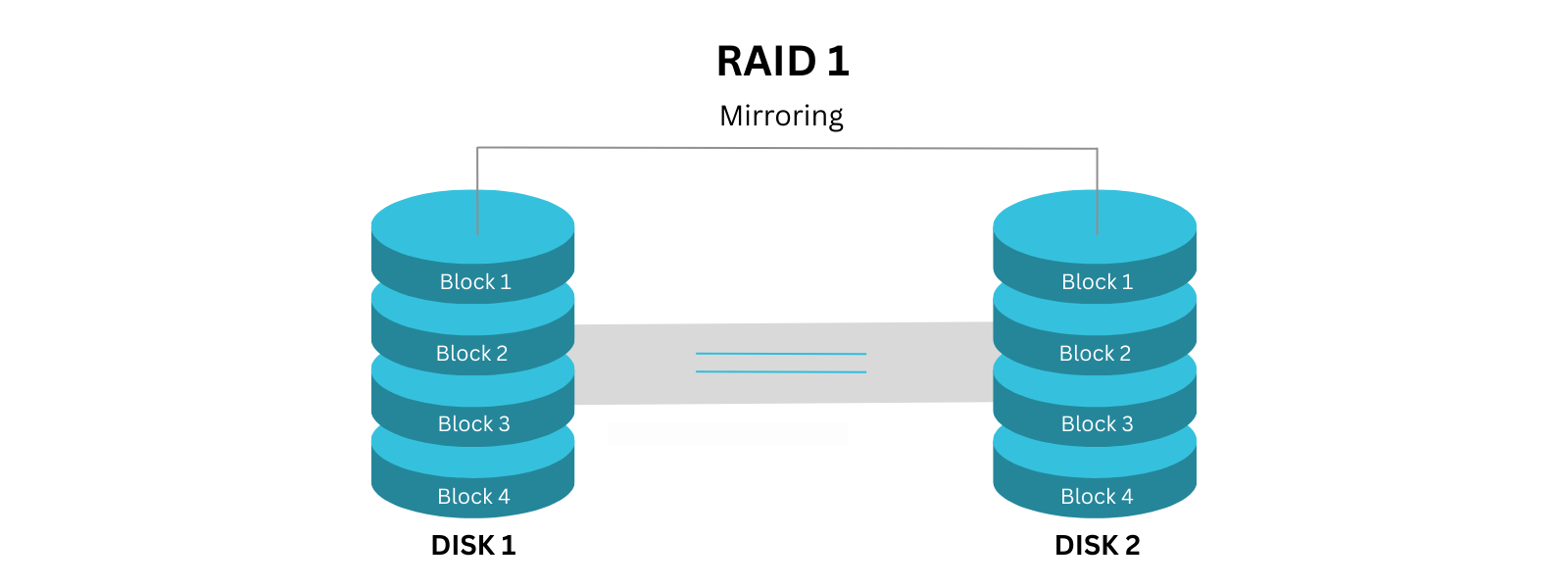
1. Mirroring (Redundancy)
Data is copied to more than one drive.
- If one drive fails, the data still exists on another
- Used where reliability is critical
Example: Like saving the same file on two USB sticks.
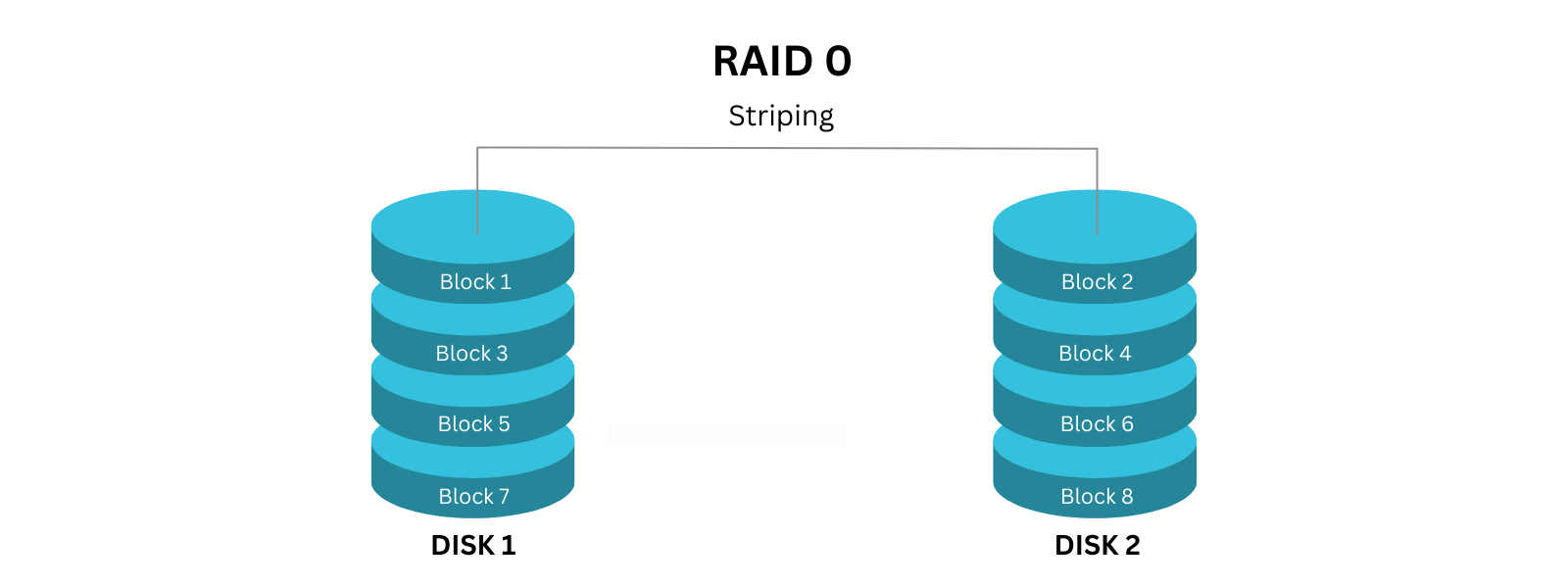
2. Striping (Performance)
Data is split into pieces and written across multiple drives at once.
- Improves speed
- Does not provide protection on its own
Example: Like multiple people carrying parts of the same load to move faster.
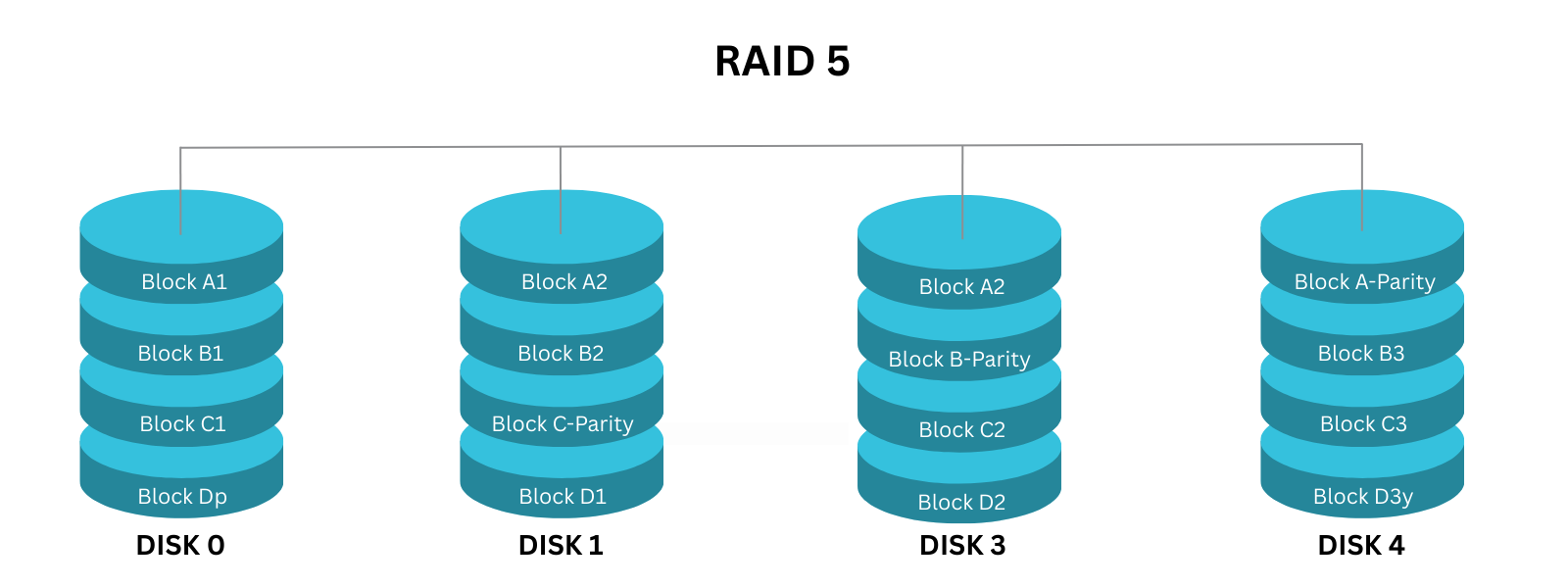
3. Parity (Balance of Speed + Protection)
Data and recovery information are spread across drives.
- Allows recovery if a drive fails
- Common in business hosting environments
Common RAID Levels
RAID levels include 0, 1, 2, 3, 4, 5, 6 and 10 (1 + 0).
Below, we’ll highlight the common RAID levels that we offer at 1-grid, and highlight RAID 0 as this forms part of RAID 10. This is simply to help you understand the differences, so you don’t need to memorise these.
0 – Speed Only
- Fast performance
- No data protection
- Not used for critical data
1 – Mirroring
- Data duplicated across drives
- High reliability
- Less storage capacity available
5 – Balanced Protection
- Combines speed and fault tolerance
- Can survive one drive failure
- Common for servers and hosting
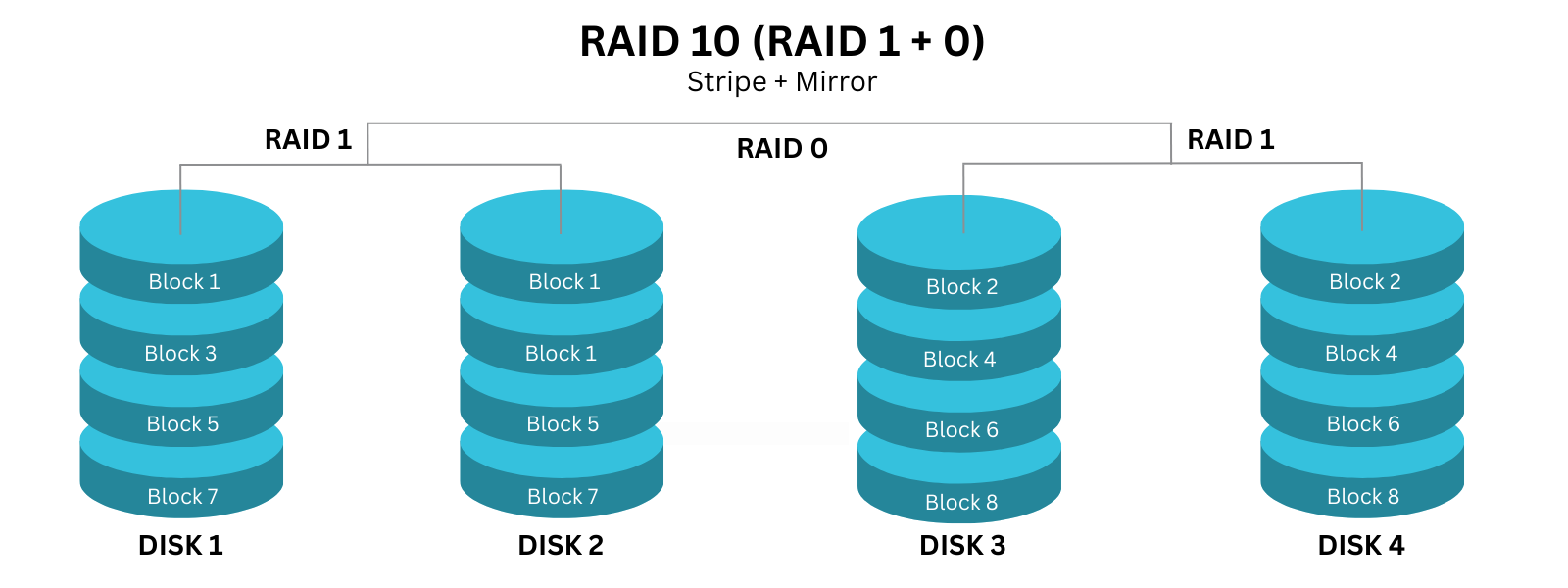
10 – Performance + Reliability
- Combines mirroring and striping
- Excellent performance and protection
- Higher cost
Why RAID Matters to You as a Customer
Even if you never interact with RAID directly, it helps by:
- Reducing downtime if a drive fails
- Improving read/write performance
- Increasing service reliability
- Supporting high-availability hosting
RAID helps keep your services available, even when hardware fails.
Dedicated Servers with RAID Options at 1-grid
At 1-grid, our Dedicated Server offerings include built-in RAID options to help protect your data and support stable, reliable performance. The available RAID level depends on the server tier you choose, ensuring the setup aligns with your workload and business needs.
Available RAID Configurations by Product
Enterprise Server
- RAID 1
Enterprise Server+
- RAID 1
Server
- RAID 1
Server+
- RAID 1
- RAID 5
- RAID 10
Managed Server
- RAID 1
Managed Server+
- RAID 1
What This Means for You
RAID 1
Prioritises data protection by mirroring your data across drives, making it ideal for reliability and peace of mind.
RAID 5
Balances performance, capacity, and redundancy for growing workloads.
RAID 10
Delivers high performance with strong fault tolerance, suited for demanding or mission-critical environments.
All RAID configurations are designed to protect against drive failure, but it’s important to remember that RAID is not a backup. We always recommend maintaining independent backups for full data protection.
Need Help Choosing the Right RAID Setup?
If you’re unsure which server or RAID option best fits your use case, our team is here to help guide you toward the right solution clearly, honestly, and without pressure.
You can explore available Dedicated Server options directly in your Customer Zone or reach out to our support team for tailored guidance.
Important Note: RAID Is Not a Backup
This is one of the most important things to understand.
RAID protects against hardware failure and not data loss events.
RAID does not protect against:
- Accidental deletion
- Malware or hacking
- Website errors
- File corruption
- Disasters or human error
IMPORTANT TIP: RAID + regular backups = real protection.
RAID vs Backups (Comparison)
| RAID | Backups |
| Protects against drive failure | Protects against data loss |
| Keeps services running | Allows data restoration |
| Real-time availability | Recovery after an incident |
TIP: They work best together, not as replacements.
Our Scope of Support
Here’s an outline of what we can do and what is not within our Scope of Support if you’re stuck and need any additional guidance or support.
What We Can Help With
- Explaining how RAID is used in hosting environments
- Advising on reliability and availability considerations
- Guiding you toward a backup solution
FAQs
Q. Do I need to choose a RAID level?
No, RAID is managed at the infrastructure level.
Q. Does RAID guarantee my data can’t be lost?
No, it reduces hardware risk but does not replace backups.
Q. Is RAID used in 1-grid hosting?
RAID-based storage is commonly used to improve reliability and availability.
Q. Is RAID only for large businesses?
No, RAID benefits anyone who values uptime and reliability.
Additional Resources
Server Backup Solutions with 1-grid
Dedicated Servers Web Hosting with 1-grid
Need Additional Support?
We’re Here to Help:
Understanding RAID and how it works doesn’t have to be technical with this easy-to-understand guide. Stuck? Contact our Support Team for further clarity and guidance (https://1grid.co.za/contact-us/). We’re ready to see how we can help!