
Your security question plays a key role in protecting your account and helping our support team assist you quickly and safely once they have completed verification with you.
This guide will show you how to update your Customer Zone security question while you’re already logged in, so you stay in control of your account and avoid delays when requesting support.
Why Your Security Question Matters
Keeping your security question up to date helps us verify your identity faster, reduces support delays, and keeps your account protected against unauthorised access. If you’ve recently shared access, updated your devices, or just want stronger control, updating your security question is a simple step with big benefits and stronger security.
You maintain control over your services without hassle while keeping your account safer.
When to Change Your Security Question
It’s a good idea to update your security question whenever your account details change or if there’s a chance your answer may no longer be private.
You should consider updating it if:
- Your current answer could be easily guessed or found online
- You’ve had trouble verifying your identity during a support request
- You’re reviewing your security settings as part of routine account maintenance
Best Practices for Choosing a Strong Security Question
Choosing your security question carefully ensures smoother, faster assistance when you need it most.
When selecting and answering your security question:
- Choose a question only you can answer, so avoid details that are easy to guess or publicly available
- Use exact punctuation, spacing, and capitalisation, and remember it must be entered the same way each time
- Avoid short or overly simple answers
IMPORTANT:
Make a secure note of your chosen question and answer in a safe place (such as a trusted password manager). This helps prevent delays if you need to complete account verification later.
Keeping this information accurate and secure ensures you stay in control of your account and helps us support you efficiently when it matters most.
Step-by-Step Guide to Change Your Security Question
Follow these steps to log into your Customer Zone and make changes:
1: Logging In to Your Customer Zone
- Go to: https://1-grid.com/client/clientarea.php
- Enter your registered email address and current password.
2: Accessing Your Account Information
- In the Customer Zone dashboard, click Account Information.
- Click Security Settings
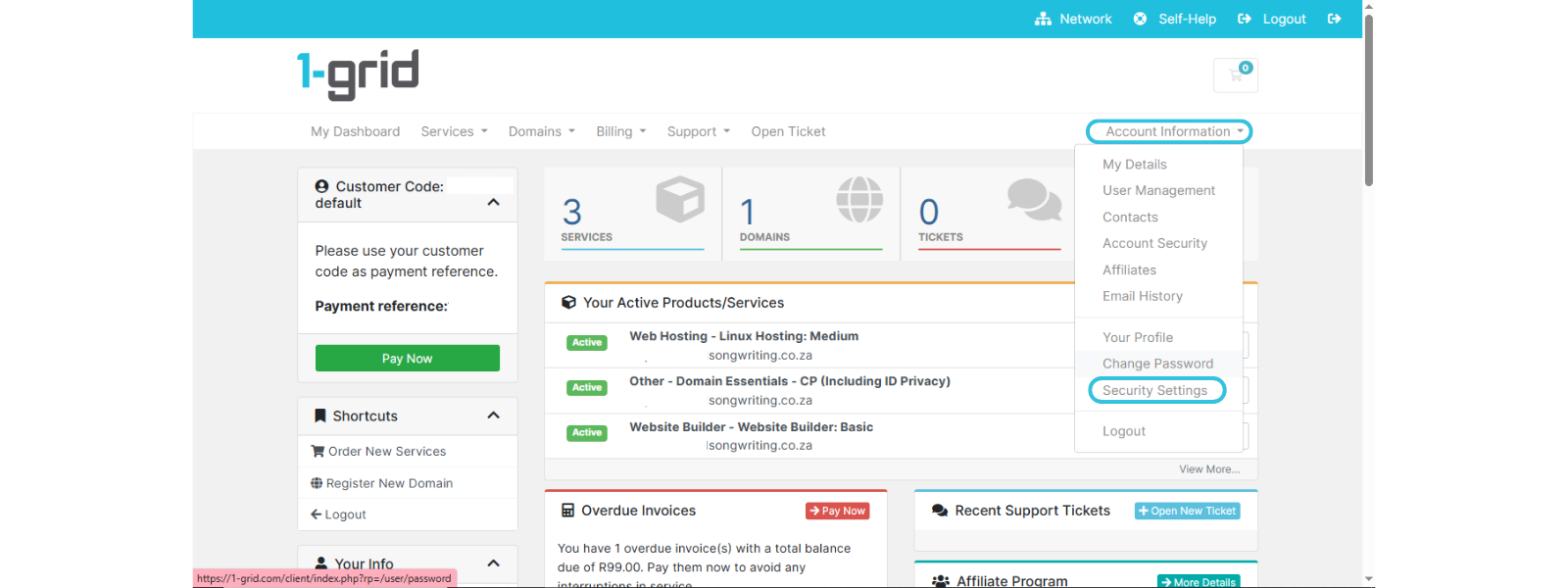
TIP: This area contains your core account controls, including key security settings.
3: Changing Your Security Question
- Enter your current security question
- Select a new security question from the drop-down
- Enter your answer
- Confirm your answer
- Click Save Changes
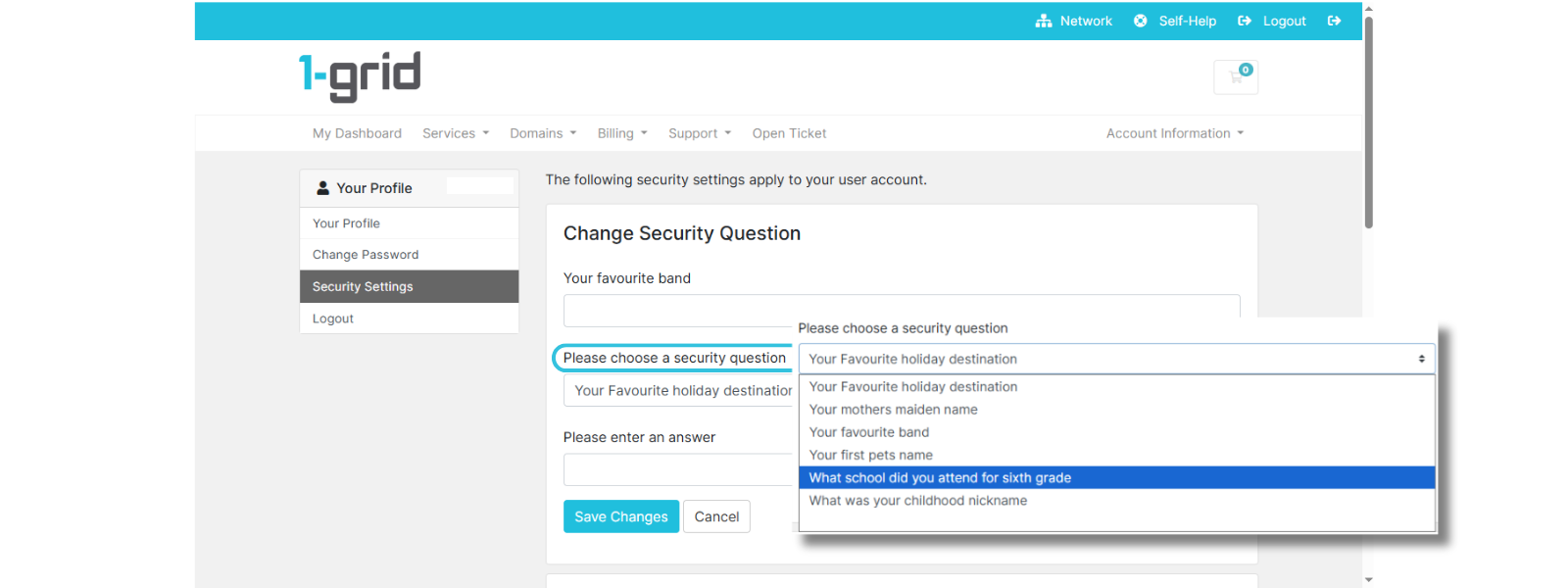
IMPORTANT: These security settings apply to your user account, not individual services.
Our Scope of Support
If you’re stuck and need any additional guidance or support, here’s an outline of what we can do and what is not within our Scope of Support.
What We Can Help With
- Guide you through updating your security question
- Help you locate the correct settings
- Assist if you’re unsure which step you’re on
What We Cannot Assist With
- Bypass security verification if the security question cannot be answered
- Change security details on your behalf
FAQs
Q. Why does 1-grid use a security question?
It helps us verify that we’re speaking to the correct account holder before making changes or sharing sensitive information.
Q. What happens if I forget my security answer?
Support may be limited until the identity verification is completed. Updating your security question in advance prevents delays.
Q. Can I use the same security question again?
Yes, but we recommend choosing something memorable yet not easily guessed.
Q. Does this affect all of my services?
It applies to your user account, which controls access to your services.
Additional Resources
Tips for Choosing a Strong Password
Updating Your 1-grid Customer Zone Password While Logged In
Retrieving a Lost 1-grid Customer Zone Password (if you’re logged out)
Keep Your 1-grid Account Details Up to Date
How to Prevent Unauthorised Access to Your Account
Verifying Your 1-grid Support Account
Two-Factor Authentication (2FA) and Why This Matters
Need Additional Support?
We’re Here to Help:
Updating your security question in your Customer Zone doesn’t have to feel like a challenge with this easy-to-reference guide. Stuck? Check out our Scope of Support, and then contact our Support Team for further clarity and guidance (https://1grid.co.za/contact-us/). We’re ready to see how we can help!