
At 1-grid, we understand how important it is to keep your hosting, email, and domain services running smoothly without any interruptions. That’s why we offer the option for paying your invoices via Direct EFT (Electronic Funds Transfer) as a trusted and familiar way to pay securely through your own bank account.
With Direct EFT, you stay in control of your payments by transferring funds directly from your bank to 1-grid’s account. While this method may take 2 to 3 working days to reflect, depending on your bank, it’s ideal for customers who prefer manual payments and want to manage their transactions independently.
This guide will walk you through everything you need to know about paying your invoices via Direct EFT with 1-grid, including how it works, its pros and cons, and step-by-step instructions on how to make a payment and view this directly through your Customer Zone.
- What Is a Direct EFT Payment?
- Pros and Cons of Paying via Direct EFT
- Available Direct EFT Options
- Our Standard Bank Account Details for Direct EFT Payments
- Why Debit Order Is the Recommended and Preferred Option
- How to Update Your Payment Method via the Customer Zone
- How to Pay Your Invoice with Direct EFT (via Customer Zone)
- When to Contact 1-grid Billing Support
- FAQs
- Additional Resources
What Is a Direct EFT Payment?
A Direct EFT (Electronic Funds Transfer) is a manual bank payment where you transfer funds directly from your bank account to 1-grid’s. This method is familiar and secure but may take 2 to 3 working days to reflect, depending on the bank’s processing time.
Once received, payments are automatically allocated to your oldest outstanding invoices to prevent overdue accounts, including any unpaid domain renewal invoices.
Pros and Cons of Paying via Direct EFT
Advantages
- Familiar and widely accessible through online banking or mobile apps.
- No need for third-party payment systems.
- Secure if done via verified banking channels.
- Ideal for customers who prefer manual control of their payments.
Disadvantages
- Payments can take up to 72 hours to reflect.
- Services may be suspended if payment is delayed or made over weekends/public holidays.
- Requires manual proof-of-payment uploads if not auto-verified.
- EFTs are allocated automatically, so specific invoice selection isn’t guaranteed if there are multiple outstanding invoices, as the oldest invoices are always settled first.
IMPORTANT: To avoid service interruptions, always pay 3 days before your due date and use your Customer Code as your payment reference.
Available Direct EFT Options
Internet Payment (EFT)
This is the preferred manual method. Log in to your online banking portal and pay directly to 1-grid’s Bank Account using your Customer Code as your reference.
Using the internet banking payment facility allows you to load us as a beneficiary for settlement to your 1-grid account.
All internet payments must be correctly referenced to ensure that 1-grid is able to identify your payment and correctly allocate it to your account.
Payments from Standard Bank to Standard Bank will be reflected immediately in our bank account. The payment will be allocated to your account between 8 a.m. and 10 a.m. the next day.
Payments from a different bank can take approximately 2 to 3 working days to reflect on your 1-grid account.
Cash Deposit at Standard Bank
You can make cash payments at your nearest bank branch directly into 1-grid’s Standard Bank account. However, please note that cash deposits often carry additional bank fees, which should be added to your total invoice amount to ensure full payment is received.
International Payment
For international customers, you can send payment via SWIFT transfer. Keep in mind that international banking fees apply, and funds may take longer (up to 10 business days) to clear.
Our Standard Bank Account Details for Direct EFT Payments
When making payment, you can use our Bank Details below, or reference them from our latest Bank Confirmation Letter.
Payment Reference: (Customer Code)
Account Holder: 1 GRID (PTY) LTD
Bank: Standard Bank
Account Number: 072987979
Universal Code: 051001
Account Type: Cheque
REMINDER: Payments are automatically allocated to your oldest outstanding invoices first to prevent overdue accounts, including any unpaid domain renewal invoices.
Why Debit Order Is the Recommended and Preferred Option
While EFT works, debit order remains the most recommended method for recurring services like hosting, domain renewals, and business email accounts.
Paying your 1-grid services by debit order is more than just convenient; it’s a smart, secure, and stress-free way to keep your services active while simplifying your billing, building trust, reliability, and financial confidence.
How to Update Your Payment Method via the Customer Zone
Follow these simple steps to update your payment method:
1. Log in to your 1-grid Customer Zone.
2. Click on Update in the Your Info section.
3. Select Direct EFT or Direct Deposit under Payment Method in your My Details section.
4. Click on Save Changes.
How to Pay Your Invoice with Direct EFT (via Customer Zone)
To make your payment using direct EFT or direct deposit:
1. Log in to your 1-grid Customer Zone.
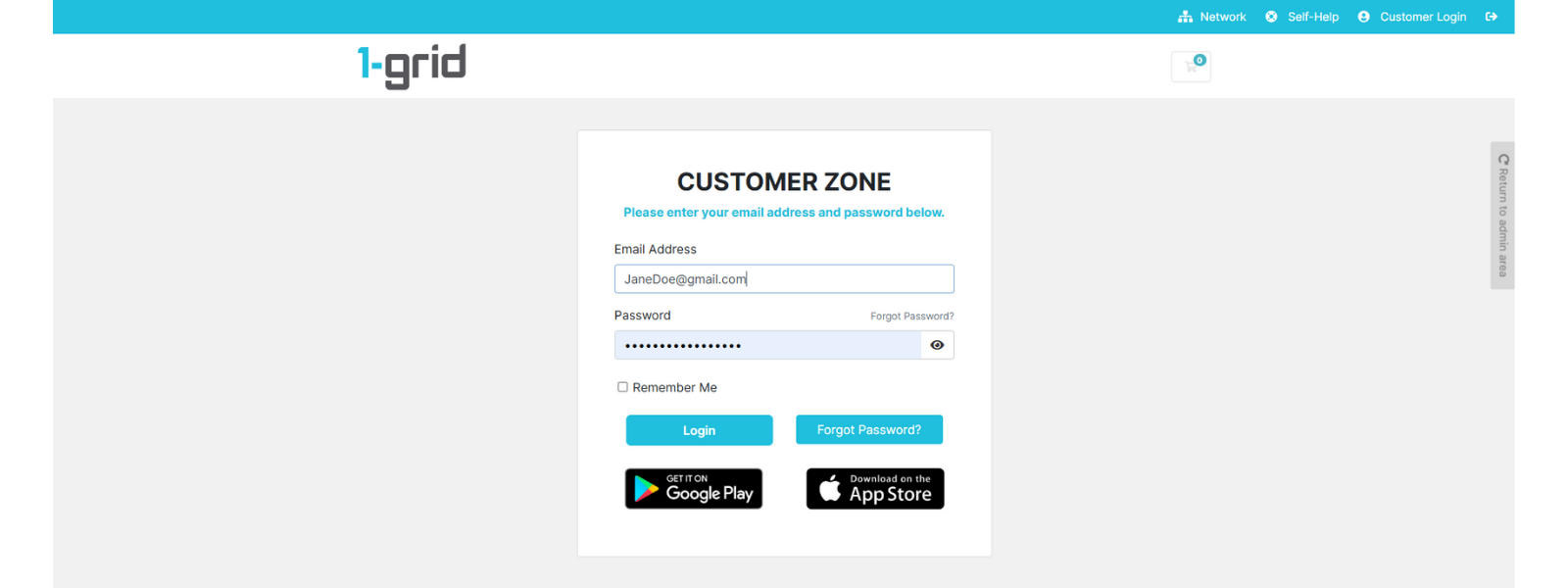
2. Click on Billing → My Invoices.
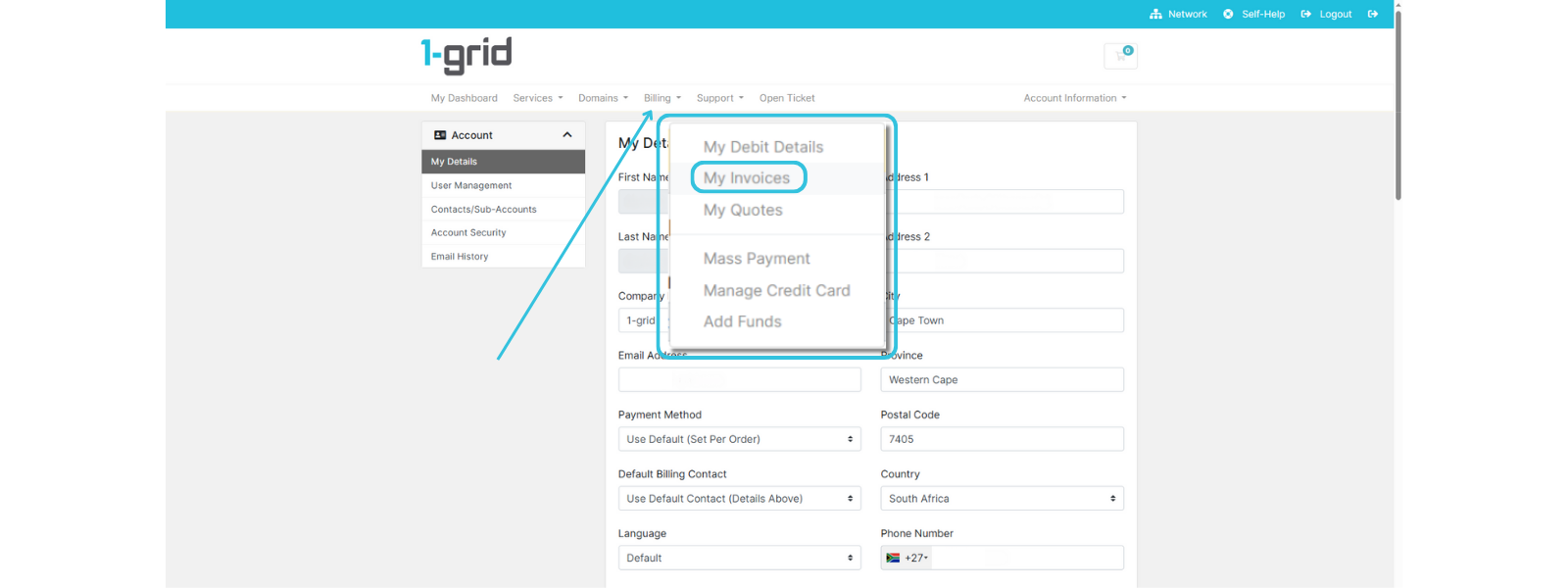
3. Locate the Unpaid invoice and click on it to open it.
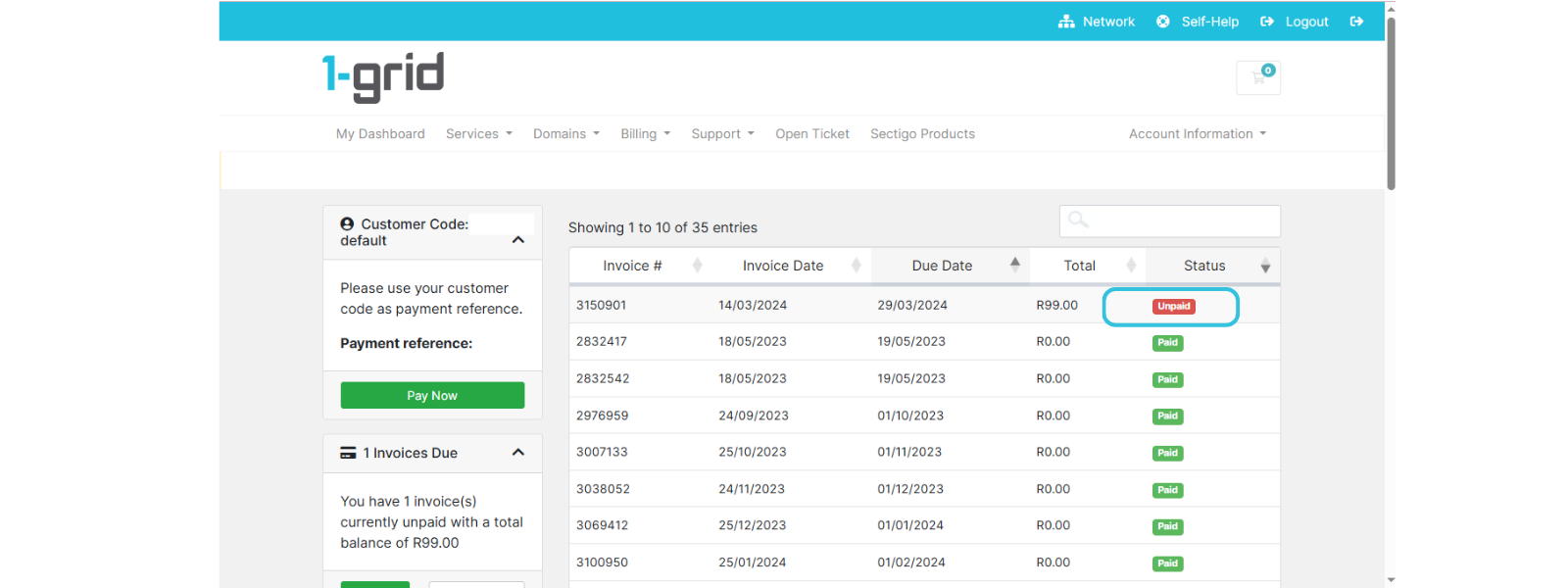
4. Make sure that Direct EFT or Direct Deposit is selected under Payment Method.
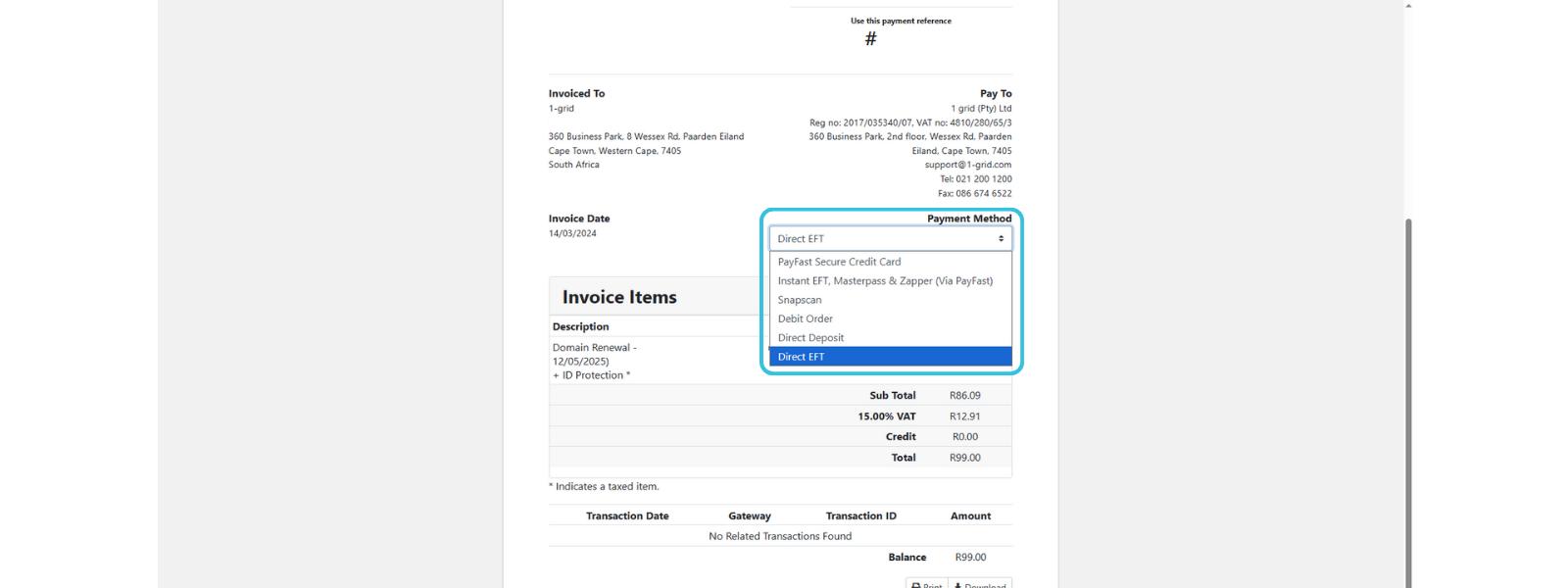
6. Take note of our Banking Details and make payment using your Customer Code listed under Use this payment reference.
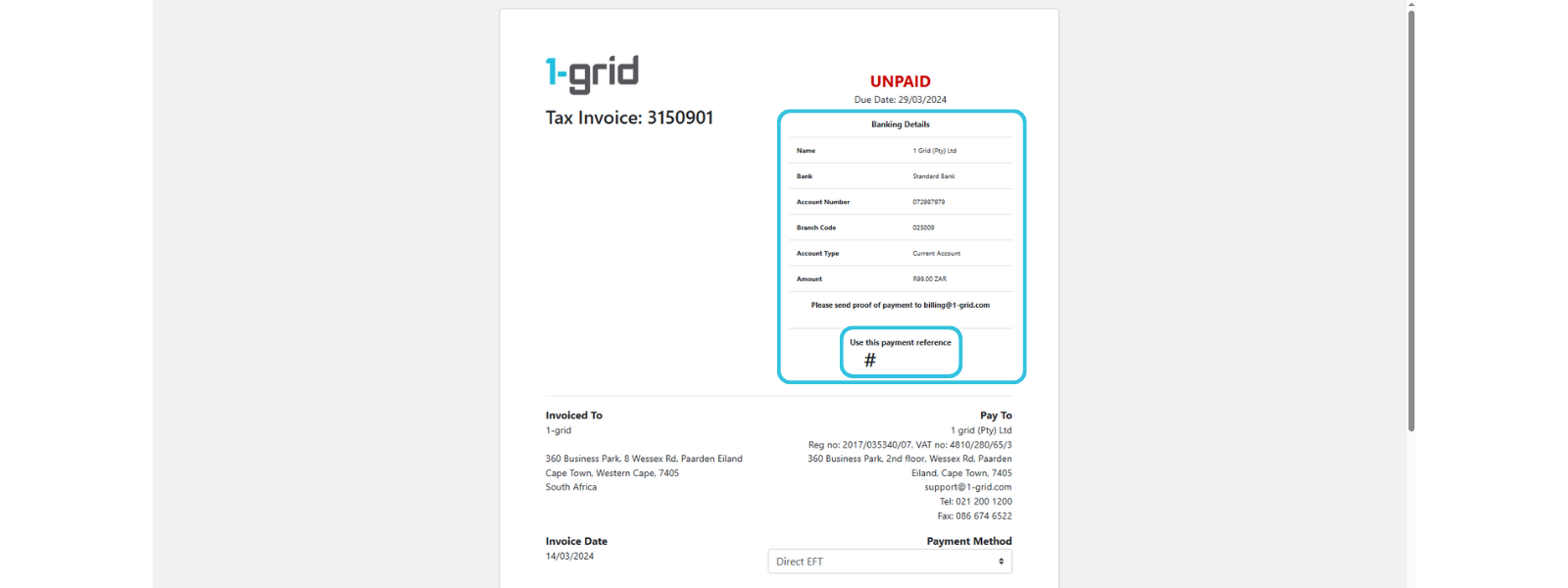
7. Complete Payment via your Mobile Banking, Online Banking or at your nearest bank.
8. Once completed, send Proof of Payment to [email protected].
Your account will be updated within 24 to 72 hours, depending on the bank you are paying from and the EFT method being used.
TIP: Always aim to pay at least 3 working days before your invoice due date to ensure no service suspensions.
When to Contact 1-grid Billing Support
Contact our Team:
- Your EFT payment hasn’t been reflected after 3 working days.
- You entered the wrong reference number.
- You need to confirm a payment or discuss an invoice allocation.
Include the following:
- Proof of payment, clearly reflecting the date, account number, amount, and reference number (Customer Code).
TIP: This helps 1-grid Billing Support get you back online faster.
FAQs
How long does an EFT payment take to reflect?
EFT payments typically reflect within 2 to 3 working days, depending on the bank.
Can I pay multiple invoices at once via EFT?
Yes, but please note that payments are automatically allocated to the oldest unpaid invoices first.
What if I accidentally use the wrong payment reference?
Contact our Billing Support Team with your proof of payment so we can manually match it to your account.
Additional Resources
Debit Orders at 1-grid
Payment Methods at 1-grid
Still Suspended After Payment
Invoicing at 1-grid
The 1-grid Android Application
Need Additional Support?
We’re Here to Help:
Paying your invoices with Direct EFT or Direct Deposit for your services doesn’t have to cause worry with this easy-to-reference guide. Stuck? Contact our Billing Team for clarity and guidance (https://1grid.co.za/contact-us/). We’re ready to see how we can help!