
At 1-grid, we understand how important it is to keep your domain and your online business safe and uninterrupted. That’s why all 1-grid domains come with a domain auto-renewal option, ensuring your website, email, and digital identity linked to your domain remain active without the risk of accidental expiry, making understanding domain auto-renewal statuses important.
This guide walks you through everything you need to know about viewing your domain auto-renew status via your Customer Zone, and the benefits of keeping it enabled to ensure a smooth renewal process for your domains.
What Is a Domain Auto-Renew Status and How Does It Work?
Domain auto-renewal statuses show whether your domain name is set to renew automatically before its expiration date. This also determines how you are invoiced for the renewal of your domain.
Auto-Renew Enabled Status
When domain auto-renewal statuses are turned on, your domain renewal invoice is automatically generated before the expiry date.
If the invoice is paid, either automatically via your saved payment method or manually through your Customer Zone, your domain renews seamlessly, helping you maintain ownership and uninterrupted service.
Essentially, this feature acts as a safety net, ensuring your domain is renewed on time, so you never have to worry about missing a payment or losing access to your website and email.
TIP: Keep your preferred payment method up to date to ensure your auto-renewal completes successfully.
Auto-Renew Disabled Status
When domain auto-renewal statuses are disabled, a renewal invoice will not be generated automatically.
This means you’ll need to manually renew and pay for your domain before it expires. If not renewed in time, your domain may enter a grace or redemption period, during which recovery could involve additional fees.
Because this setting is decided directly by you, 1-grid will not automatically renew or charge your account, ensuring you remain in full control of your domain activity.
However, it’s important to remember that disabling auto-renewal also means:
- You won’t receive automatic renewal reminders.
- Your domain won’t be renewed unless payment is made manually.
IMPORTANT:
The auto-renewal invoice serves as a helpful reminder, not a confirmation of payment. Your domain will only renew once payment is successfully processed.
Keeping auto-renewal enabled is the simplest way to stay proactive and prevent service interruptions, while disabling it gives you full manual control over renewals.
Either way, 1-grid empowers you to choose the renewal option that best fits your business, with clarity, flexibility, and confidence.
Benefits of Enabling Auto-Renew
Enabling auto-renewal is one of the simplest ways to protect your brand and business online. Here’s why:
Prevents Accidental Domain Expiry
Never risk losing your domain due to missed payments.
Ensures Uninterrupted Service
Keeps your hosting, website, and email running seamlessly.
Saves Time
Avoids the need to manually monitor renewal dates.
Provides Peace of Mind
You’ll always know your domain is safe, secure, and active.
Supports Your Business Continuity
No downtime, no disruption; just reliability.
TIP: For auto-renewal to succeed, always ensure your preferred payment method (Debit Order or Credit Card) is up to date in your Customer Zone.
How to View Your Domain Auto-Renew Status via Customer Zone
Follow these steps to confirm your domain’s auto-renewal settings:
1. Log in to your 1-grid Customer Zone.
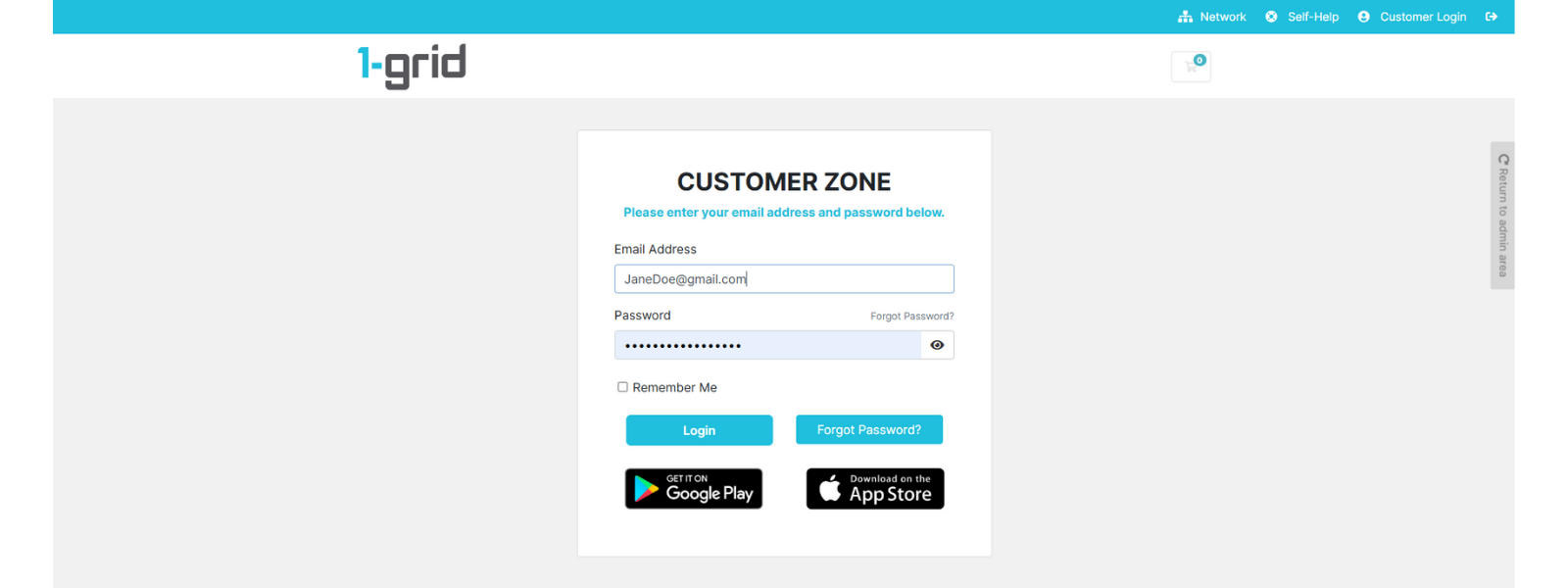
2. Navigate to the Domains tab.
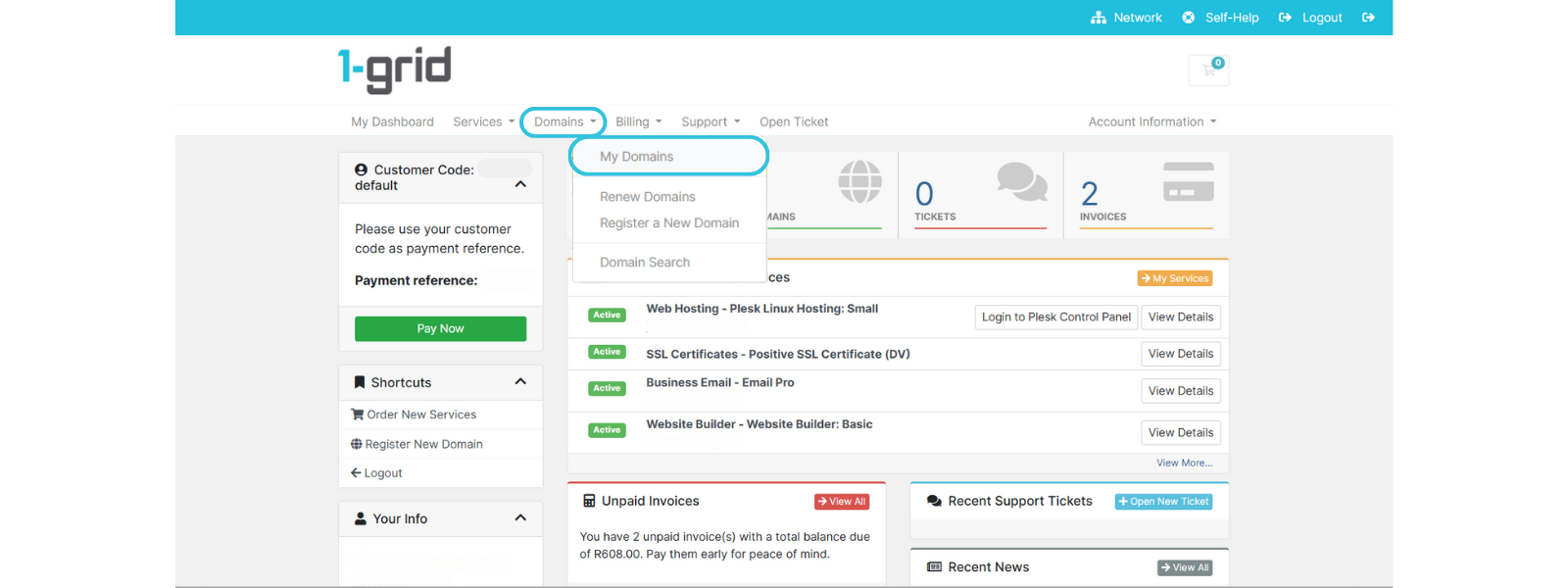
3. Search the domain you would like to confirm the status for once on the Domains Dashboard, then review the status.
- Auto Renew (Green Tick): Your domain will renew automatically.
- Auto Renew (Red Cross): You’ll need to manually renew your domain before expiry.
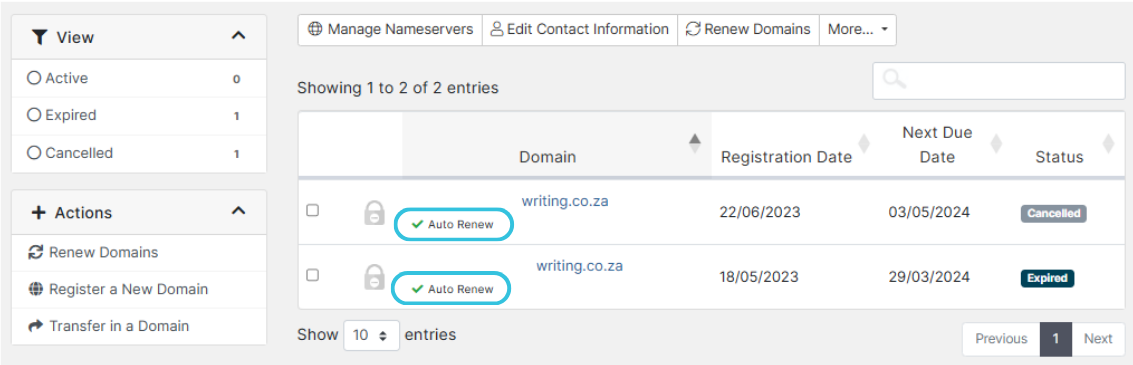
If you wish to update this setting, you can contact our Team.
IMPORTANT: Changes take effect immediately, but remember, renewals depend on active payment methods, and we recommend that you make updates at least 65 days before your renewal date. For instances where you request to disable your domain’s auto-renewal status, this means that no further billing will occur for this; however, your domain will remain in an “Active” status in your Customer Zone, and will be set to expire on the Expiry Date of the domain.
When to Contact 1-grid Support
Contact our Team with a follow-up if you:
- Unsure whether your payment method supports auto-renewal.
- Experience issues with checking your auto-renew status.
- Need help reactivating a domain that has expired.
- Require assistance with enabling or disabling the auto-renew on your domain.
FAQs
Can I disable auto-renew if I no longer want the domain?
Yes, you can request to disable auto-renew anytime by reaching out to our Team at [email protected], if you plan not to renew your domain.
Will I be charged automatically when auto-renew is enabled?
Yes, the renewal invoice will be issued, and payment will be processed using your active payment method before the expiry date.
Additional Resources
Understanding Domain Renewal Invoices at 1-grid
Bring Your Brand Online with Domains at 1-grid
Payments Made Easy at 1-grid
How Invoicing Works at 1-grid
All You Need to Know About Suspensions at 1-grid
Need Additional Support?
We’re Here to Help:
Understanding domain auto-renewal status doesn’t have to feel complicated with this easy-to-reference guide. Stuck? Contact our Cancellations or Billing Team for clarity and guidance (https://1grid.co.za/contact-us/). We’re ready to see how we can help!