

A catch-all email address (mailbox) can help ensure you don’t miss important emails sent to incorrect or non-existent addresses, but it’s important to understand both its benefits and potential drawbacks before enabling it.
This guide will help you configure a catch-all email address for your domain using cPanel.
By the end of this guide, you’ll understand what a catch-all email address does, when it should be used, how to configure it, and how to manage it responsibly.

What This Means
A catch-all email address (also called a Default Address in cPanel) receives emails sent to email addresses that don’t exist on your domain.
For example, if your domain is:
yourbusiness.co.za
and someone accidentally sends an email to:
instead of:
the catch-all mailbox can receive that message instead of it being rejected.
This feature is useful if:
- You want to capture emails sent to mistyped addresses.
- You’re concerned about missing enquiries from customers.
- You’re transitioning between email addresses.
- You manage a business where every enquiry is important.
Because a catch-all accepts mail addressed to any non-existent mailbox, it may also receive spam sent to random email addresses.
Understanding How Catch-All Email Works
Catch-all addresses only receive emails sent to addresses that do not already exist.
If an email is sent to any of the following, it will continue following its normal routing:
- an existing mailbox
- an email forwarder
- an alias
The catch-all only handles mail that would otherwise have nowhere to go.
When Should You Use a Catch-All?
A catch-all mailbox can be particularly useful if:
- Customers frequently mistype your email address.
- You don’t want to miss potential sales enquiries.
- You’re launching a new business.
- You’re consolidating multiple legacy email addresses.
It provides an extra safety net for important communications.
Managing Spam
Because every invalid address is accepted, catch-all mailboxes often receive significantly more spam than standard email accounts.
To minimise unwanted email:
- Forward the catch-all to a mailbox that is actively monitored.
- Enable spam filtering where available.
- Use mailbox rules or folders to organise incoming messages.
- Review catch-all traffic regularly.
- Disable the catch-all if spam becomes excessive.
Steps to Set Up a Catch-All Email Address in cPanel
Step 1: Log in to cPanel
Before configuring a catch-all email address, log in to your cPanel account.
If you’re accessing cPanel through your 1-grid hosting account, open the cPanel dashboard for the hosting package associated with your domain.
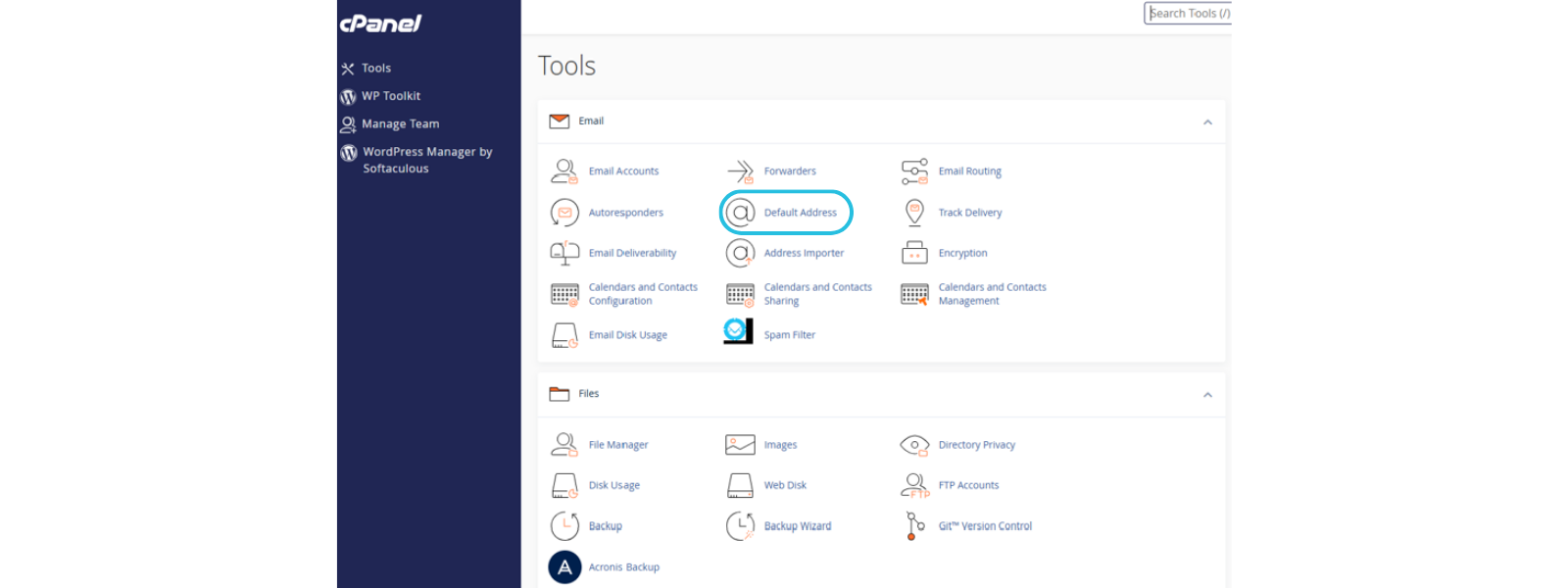
Step 2: Open the Default Address Feature
From the cPanel home page:
- Scroll to the Email section.
- Click Default Address.
This tool manages your domain’s catch-all email settings.
Step 3: Select Your Domain
If your hosting account manages multiple domains:
- Select the domain you want to configure from the Domain drop-down list.
If you only host one domain, it may already be selected automatically.
Step 4: Configure the Catch-All Address
Choose:
- Forward to Email Address
Then enter the mailbox that should receive all emails sent to invalid or non-existent addresses.
For example:
Click Change to save your settings.
Your catch-all email address is now active.
Step 5: Disable the Catch-All (Optional)
If you no longer want to receive unrouted email:
- Return to Default Address.
- Select:
Discard the email while your server processes it by SMTP with an error message - Save your changes.
Future emails sent to invalid addresses will be rejected instead of forwarded.
Important Things to Know
- Catch-all email only applies to addresses that do not already exist.
- Existing mailboxes and forwarders are not affected.
- A catch-all can significantly increase spam volume.
- Changes take effect immediately after saving.
- You can enable or disable the feature at any time.
Before You Move On
After configuring your catch-all email:
- Send a test email to a non-existent address on your domain.
- Confirm that the message arrives in your chosen mailbox.
- Verify that legitimate email continues reaching existing mailboxes.
- Check your spam folder during testing.
- Review your spam filtering settings if necessary.
Common Mistakes to Avoid
- Forwarding the catch-all to an unattended mailbox.
- Assuming it replaces individual email accounts.
- Forgetting to monitor the destination mailbox.
- Leaving a catch-all enabled when it’s no longer needed.
- Ignoring increased spam after enabling the feature.
If This Didn’t Work
If your catch-all email isn’t working as expected, collect the following before contacting support:
- Your domain name.
- The destination email address configured as the catch-all.
- The sender’s email address.
- The approximate date and time the email was sent.
- Any bounce-back or error messages received.
- Screenshots of your Default Address settings in cPanel.
Having this information will help our support team investigate more efficiently.
Related Articles
- How to Access cPanel
- How to Create an Email Account in cPanel
- How to Create an Email Forwarder
- How to Access Webmail via cPanel
FAQs
What is a catch-all email address?
A catch-all email address receives messages sent to email addresses that don’t exist on your domain.
Will existing email accounts still receive their mail?
Yes. Existing mailboxes and email forwarders continue working normally. The catch-all only handles unrouted email.
Can I turn off the catch-all later?
Yes. You can disable or change the catch-all configuration at any time through cPanel.
Why am I receiving more spam after enabling a catch-all?
Because the server accepts emails sent to any invalid address on your domain, automated spam messages are also more likely to be delivered.
Should every business use a catch-all?
Not necessarily. While it can help capture genuine enquiries, businesses that receive large amounts of spam may prefer to disable it.
Does the catch-all create new email addresses?
No. It simply redirects emails addressed to non-existent mailboxes to the destination mailbox you specify.
Empowering Insight

A catch-all email address can help prevent missed opportunities, but it works best when paired with good spam management and regular mailbox monitoring. Reviewing your email settings periodically helps keep communication reliable and organised.
Need Additional Support?
If you’re unable to configure your catch-all email address or it’s not behaving as expected, first work through the checks in this guide.
If you still need assistance, contact us with your domain name, screenshots of your cPanel settings, and any relevant error messages so we can help you troubleshoot the issue.