
At 1-grid, we know how important it is to keep your hosting, email, and domain services active without disruption. That’s why we offer the option to add funds as credit to your account, making it a simple, secure, and proactive way to stay on top of your payments.
By adding funds to your 1-grid account, you can automatically pay invoices when they’re due, giving you one less thing to worry about! This also means no manual payments, no delays, and no risk of service suspension. It’s perfect for maintaining full control over your billing while enjoying the convenience of automatic renewals and faster processing.
This guide will show you how to add funds as credit directly through your Customer Zone, using secure payment options.
- Why Add Funds as Credit to Your 1-grid Account?
- Benefits of Adding Funds as Credit
- Available Payment Options to Add Funds to Your 1-grid Account
- Why Debit Order Is the Recommended and Preferred Option
- How to Add Credit to Your 1-grid Account (via Customer Zone)
- Checking Your Credit Balance on Your 1-grid Account (via Customer Zone)
- Paying Invoices with Credit on Your 1-grid Account (via Customer Zone)
- When to Contact 1-grid Billing Support
- FAQs
- Additional Resources
- Need Additional Support?
Why Add Funds as Credit to Your 1-grid Account?
Adding funds to your account as credit means that funds have been preloaded onto your 1-grid account so that this can be used to pay any future invoices for domains, hosting, and other services, giving you peace of mind while other things need your attention. You can even use your credit to pay for any new or future orders as your business expands, making planning for the future more exciting!
Benefits of Adding Funds as Credit
Instant Payments means no waiting period as future invoices are settled immediately.
Automatic Renewal Protection prevents downtime or missed renewals.
Budget-friendly means you can manage expenses proactively by pre-funding your account.
Convenient means avoiding repeated manual payments for every invoice.
Flexible means using your credit for any 1-grid service whenever needed.
Secure means peace of mind as payments are handled in your 1-grid Customer Zone.
Available Payment Options to Add Funds to Your 1-grid Account
Debit Order
The easiest and most reliable way to keep your services active is debit order as these payments are automated each month, ensuring your hosting, domains, and emails are never interrupted. Once set up, your invoices are settled automatically, saving you time and preventing missed payments.
Best if: You want a hands-off, stress-free payment option.
Secure Credit Card via PayFast
PayFast lets you make instant, secure payments using your credit or cheque card. Your details are encrypted and never shared, giving you peace of mind with every transaction. You’ll also get real-time payment confirmation, ensuring your services stay active immediately after payment.
Best if: You prefer flexibility and instant processing.
SnapScan
With SnapScan, you can pay invoices instantly by scanning a QR code from your smartphone, which means no card or bank login is needed. It’s fast, secure, and convenient for on-the-go payments, ensuring your services stay uninterrupted with just one scan.
Best if: You’re a mobile user who values quick and easy payments.
Instant EFT (via PayFast)
Instant EFT allows you to make secure online payments directly from your bank account without waiting for traditional EFT clearance. Funds reflect immediately, and your 1-grid services are renewed or activated right away.
Best if: You want instant confirmation without using a card.
Direct EFT
Direct EFT gives you full control of your payments by transferring funds directly from your bank to 1-grid’s account. While payments may take 2 to 3 working days to reflect, this method suits those who prefer manual transactions and managing payments independently.
Best if: You prefer traditional banking and full control over payment timing.
IMPORTANT: To avoid service interruptions, always add funds at least 3 days before any future due invoice date and use your Customer Code as your payment reference when making Direct EFT payments so that our Team can allocate this correctly.
Why Debit Order Is the Recommended and Preferred Option
Adding funds as credit to your account for your 1-grid services by debit order is more than just convenient; it’s a smart, secure, and stress-free way to keep your services active while simplifying your billing, building trust, reliability, and financial confidence.
How to Add Credit to Your 1-grid Account (via Customer Zone)
Before attempting to add funds, it is important to make sure that you have an active order on your account. You will receive an alert before adding funds to let you know!

If you have at least one active order, you can proceed to add funds as credit to your account by following these steps:
1. Log in to your 1-grid Customer Zone.
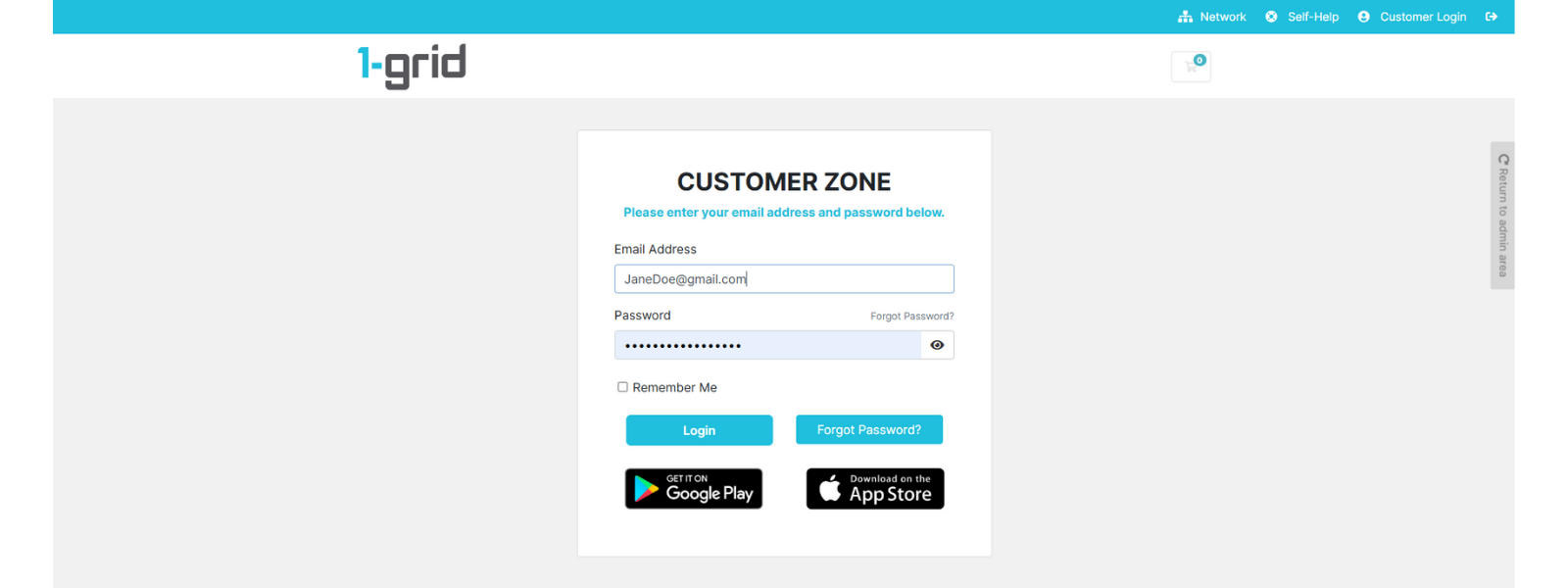
2. Click on Billing → Add Funds.
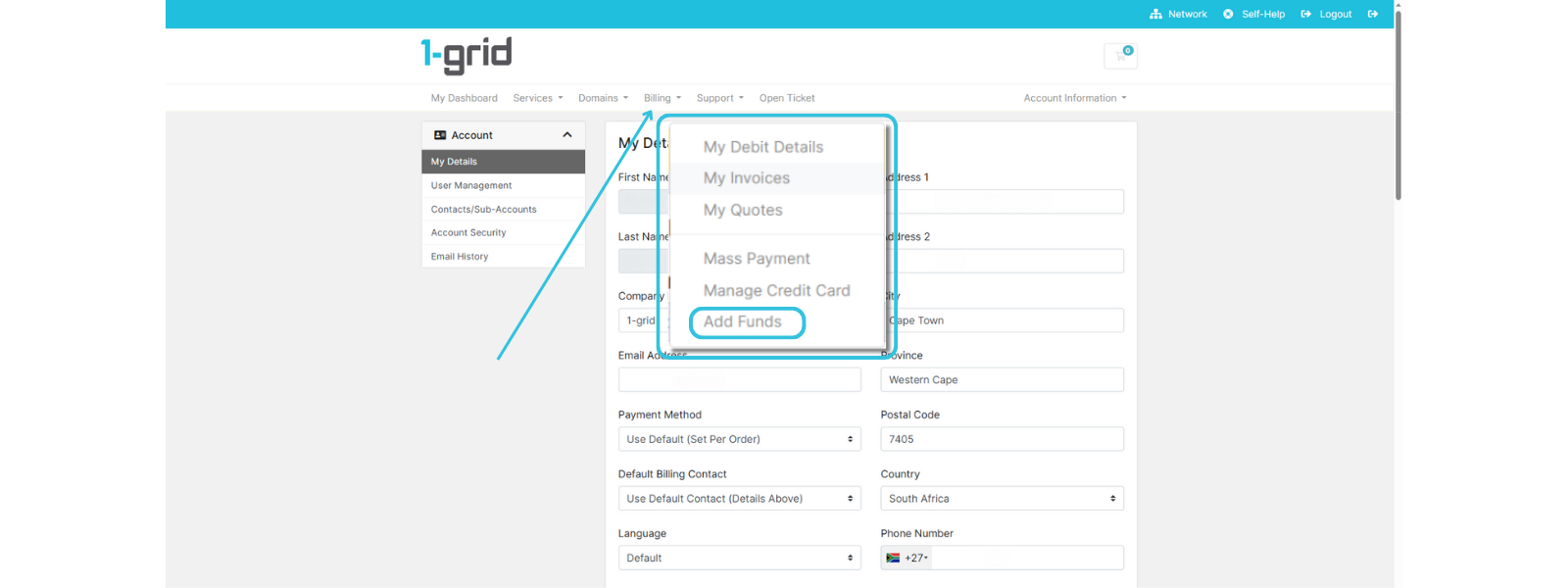
3. Enter the desired amount in Amount to Add between R10.00 and R30,000.00.
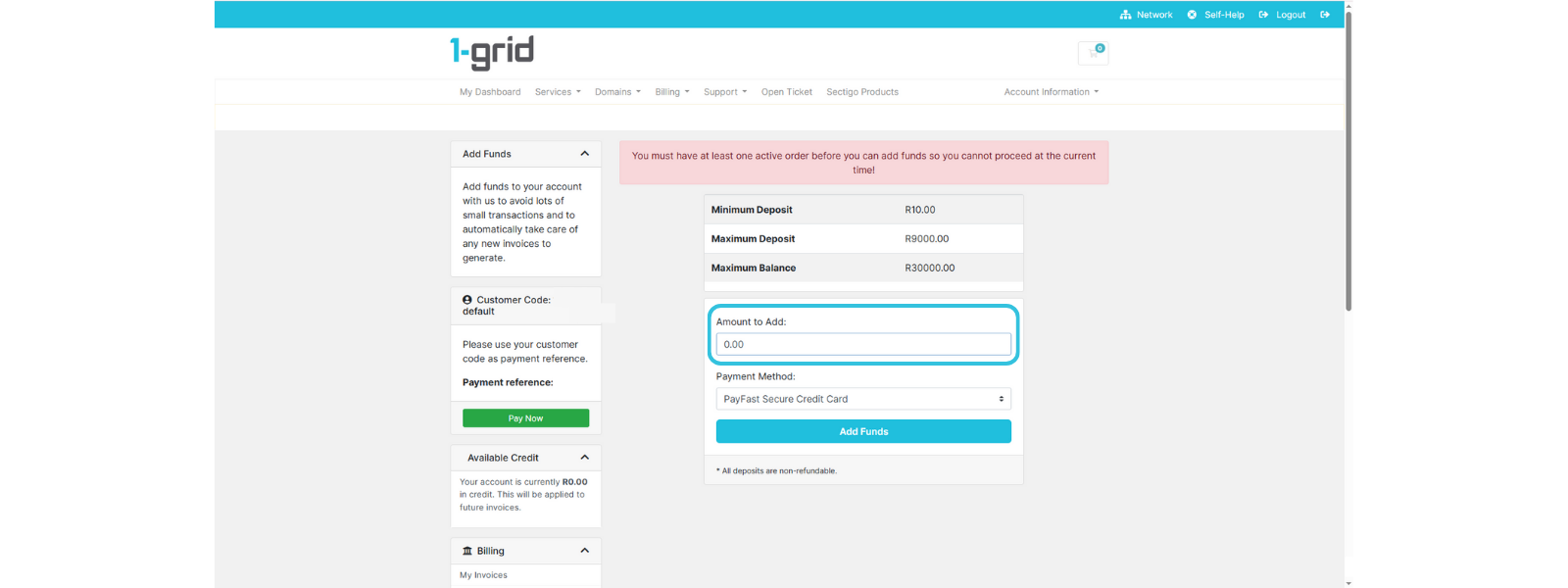
4. Choose your preferred Payment Method (Debit Order, EFT, Credit Card, etc.).
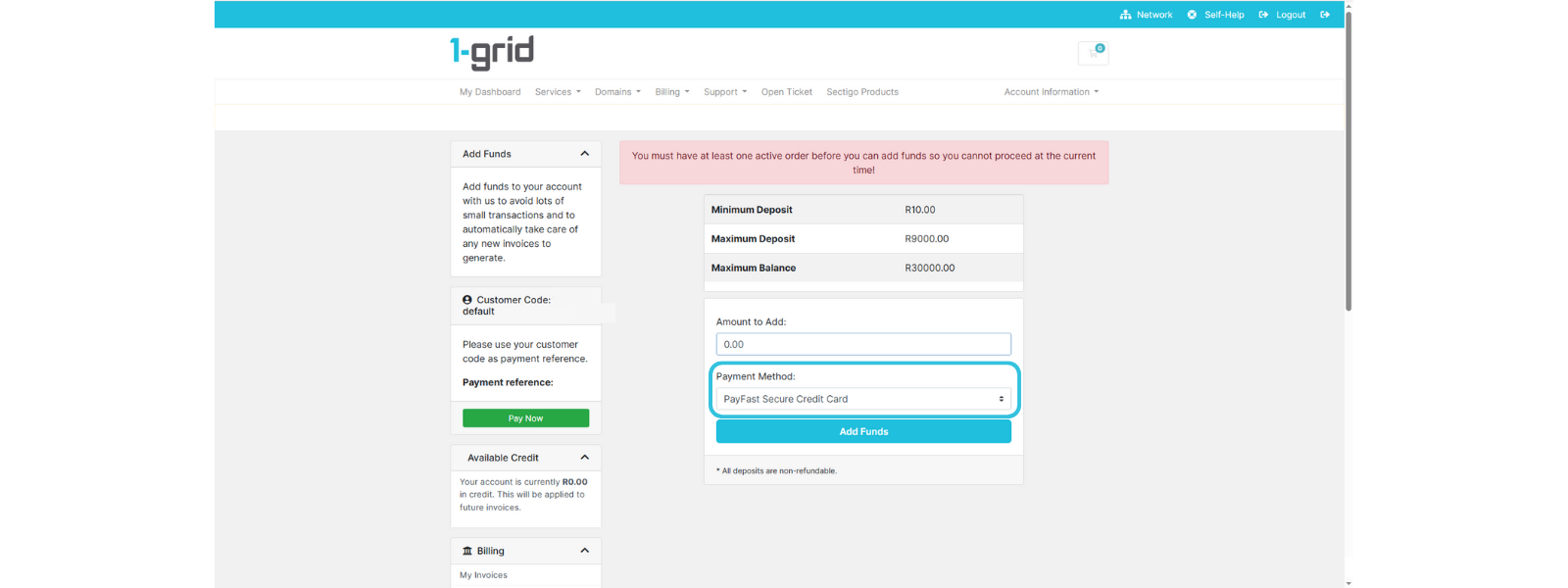
5. Click on Add Funds and then follow any payment prompts that follow, according to the Payment Method you selected.

6. Confirm payment and wait for it to reflect (typically immediate for Card/PayFast or 2 to 3 working days for Direct EFT).
TIP: Funds added to your account are automatically available to pay future invoices.
Checking Your Credit Balance on Your 1-grid Account (via Customer Zone)
Once you have added funds to your account, it’s easy to keep an eye on this to stay ahead of upcoming invoices for your domains, hosting, and other services. When time is of the essence, we’ve made it simple to stay ahead of the game with our easy-to-follow guide.
Paying Invoices with Credit on Your 1-grid Account (via Customer Zone)
Making payment on any of your invoices using your existing or new credit balance is just as easy! View our easy-to-follow guide on how to do this and never miss a payment again!
When to Contact 1-grid Billing Support
Contact our Team:
- The credit doesn’t reflect after a successful payment.
- An incorrect amount was applied or deducted.
- You’re struggling to add funds to your account via your Customer Zone.
Include the following:
- Proof of payment, clearly reflecting the date, account number, amount, and reference number (Customer Code), where applicable.
- Details of the issue you are experiencing.
TIP: This helps 1-grid Billing Support get you back online faster.
FAQs
How long does it take for credit to reflect?
Payments via Debit Order, PayFast, or Credit Card are instant. Manual EFT payments can take 2 to 3 working days to reflect.
Additional Resources
Everything You Need to Know About Debit Orders at 1-grid
Our Easy-to-Use Payment Methods at 1-grid
How Do I Update My Payment Method?
Everything You Need to Know About Invoicing at 1-grid
Payment FAQs
Need Additional Support?
We’re Here to Help:
Adding funds as credit in your 1-grid account doesn’t have to feel like a challenge with this easy-to-reference guide. Stuck? Contact our Billing Team for clarity and guidance (https://1grid.co.za/contact-us/). We’re ready to see how we can help!