
Connecting your domain to Wix is a powerful step in building your online presence and pointing your domain through cPanel ensures you keep full DNS control with 1-grid while directing your website traffic to your Wix site. This method is ideal if your email is hosted with 1-grid or if you prefer managing DNS from one trusted place.
Below, we guide you through everything you need to know, from requirements to step-by-step updates, in a clear and empowering way.

Why DNS Pointing to Wix Is Recommended
DNS Pointing is the preferred connection method when:
- Your email is hosted at 1-grid and must remain uninterrupted
- You want to keep all DNS records visible, editable, and managed directly in cPanel.
- You want more stability and transparency over your DNS.
- You prefer not to switch DNS hosting to Wix.
This option ensures your website loads from Wix while your email and all other DNS functions remain safe under your existing 1-grid setup.
Important Requirements Before You Begin
To ensure a smooth connection, please note the following:
1. Your Wix site must be upgraded
Wix only allows domain connections (pointing or nameservers) on a paid plan.
2. Wix does not support DNSSEC
If DNSSEC is enabled on your domain, Wix will not accept connections, so please disable DNSSEC in your Customer Zone before proceeding.
3. DNS proxies such as Cloudflare are not supported
If your domain uses Cloudflare, the Wix connection will fail due to proxying. This means disabling Cloudflare or switching to the “DNS Only” (grey cloud) mode for all records is required.
Steps to Point Your Domain’s DNS to Wix via cPanel
Follow the steps below to point your domain using the A record and CNAME record provided by Wix.
1: Log in to cPanel
- Sign in to your 1-grid Customer Zone
- Select your hosting service
- Click Log in to cPanel
2: Open the DNS Zone Editor
- Scroll to Domains
- Select Zone Editor
- Choose the domain you want to point
- Click Manage
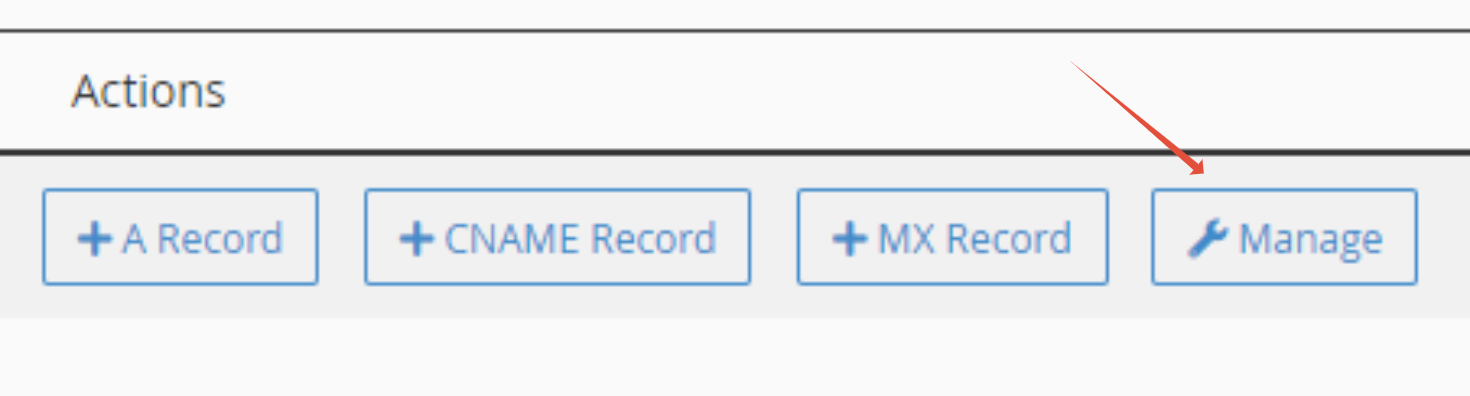
3: Add or Update the A Record
Wix will provide you with an A record (usually an IP address).
- Find the existing A record for your domain
- Edit it and replace the current IP with Wix’s IP
- If there is no A record, click Add Record
- Type: A
- Name: yourdomain.co.za
- Value: Wix IP
- Save
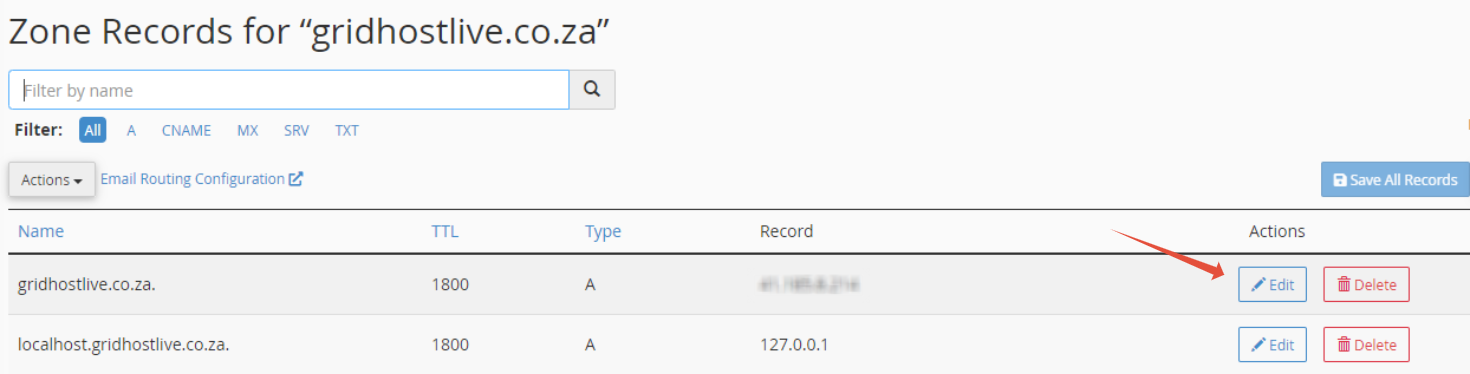
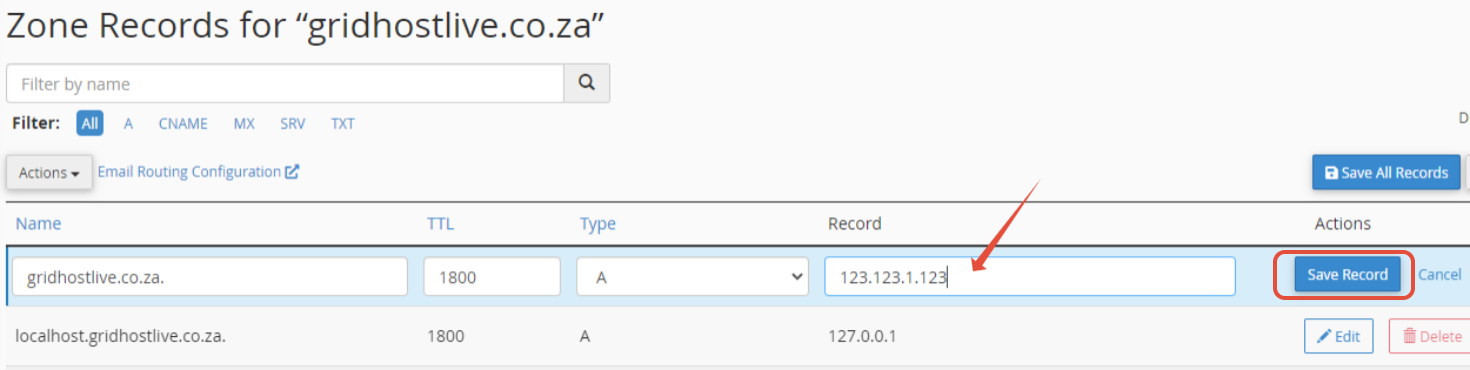
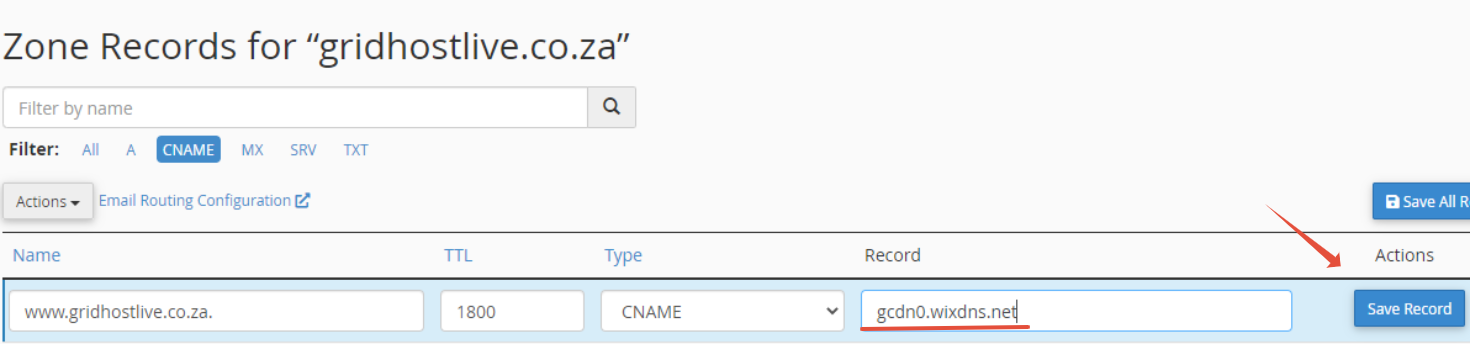
4: Add or Update the CNAME Record for “www”
Wix requires the www subdomain to point to their servers.
- Locate the CNAME record for “www”
- Edit the value to:
www → pointing.wixdns.net (or the value specified in your Wix dashboard)
If missing, add it:
- Type: CNAME
- Name: www
- Value: your Wix CNAME target
- Save
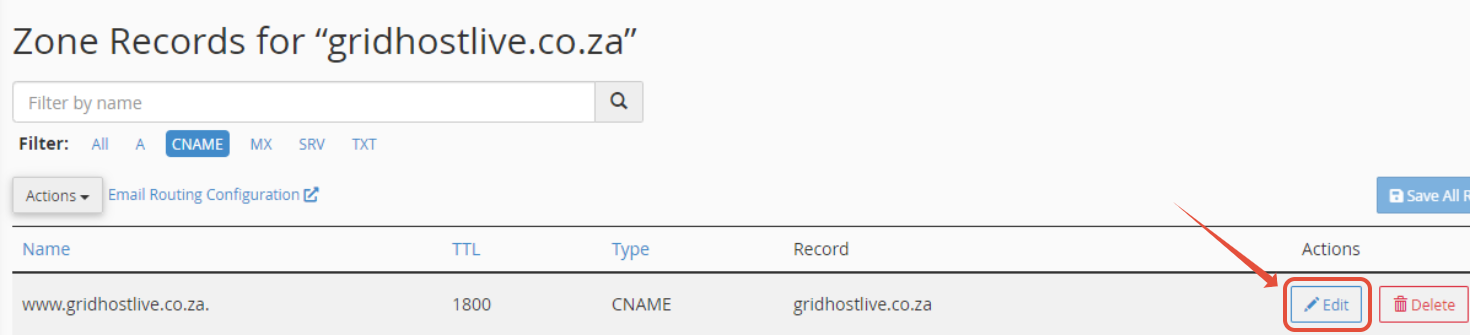
5: Wait for DNS Propagation
Changes take up to 24 hours, so while most changes reflect sooner, full global propagation may take the full window.
FAQs
Q: Will pointing affect my email?
No, pointing keeps your DNS managed through 1-grid, so your email continues working normally.
Q: Why does Wix require a paid plan?
Wix only allows domain connections (including pointing) on active paid plans.
Q: Is pointing better than changing nameservers?
Yes, this is recommended because pointing is better when:
- You host email with 1-grid
- You want full DNS visibility
You want faster troubleshooting and local support.
Q: Why must DNSSEC be disabled?
Wix does not support DNSSEC signing, and domains with DNSSEC enabled cannot connect to Wix for domains that were not registered or transferred to them.
Additional Resources
Everything DNS at 1-grid
Setting Up Your 1-grid Domain with Wix
How to Point Your Domain to Wix via Plesk
How to Point Your Mail Record to 1-grid from Wix
Connecting a Wix Domain to an External Site
Need Additional Support?
We’re Here to Help:
Pointing your 1-grid domain to Wix via cPanel doesn’t have to feel technical with this easy-to-use guide. Stuck? Check out our Scope of Support, and contact our Support Team for any further clarity and guidance (https://1grid.co.za/contact-us/). We’re ready to see how we can help!