
Phishing emails are becoming an increasingly serious threat in South Africa, with recent reports showing that hundreds of local businesses fall victim to these scams every year. From the recent cases that have been reported, the lowest loss was R600 000 which can be crippling for a small or medium business.
This article will provide seven practical ways to spot phishing emails, share real-life examples of scams targeting South African businesses, and outline clear steps to avoid and prevent phishing attacks.
By understanding the warning signs and implementing effective safeguards, SMEs can protect themselves and their customers from costly cyber threats.

What Is a Phishing Email (and Scam Emails)
A phishing email is a fraudulent message crafted to deceive recipients into revealing sensitive information such as login credentials, banking details, or personal data. While “scam emails” and “fake emails” are general terms used for fraudulent communication, phishing emails specifically mimic trusted organisations or individuals to steal information or install malicious software.
The ultimate goal of phishing is to exploit trust for financial or data gain. Some attackers aim to steal passwords or credit card details (credential theft), while others use phishing as a gateway to financial fraud or to install ransomware that locks company systems until a ransom is paid.
Phishing campaigns often rely on psychological manipulation, using fear, urgency, or authority to push victims into acting quickly without verifying legitimacy. A common tactic is to use spoofed or look-alike domains that resemble real company addresses. Domain security measures like SPF, DKIM, and DMARC help prevent these impersonation attempts by verifying the authenticity of sender domains, protecting both businesses and customers from fraudulent communication.
7 Ways to Spot Phishing Emails
Spotting a phishing email can be tricky, especially as cybercriminals continue to refine their tactics and impersonate trusted brands. However, there are clear warning signs that can help you identify fraudulent emails before they cause harm. By learning what to look for, you can protect your business, your data, and your finances.
Here are seven key ways to recognise a phishing email and avoid becoming a victim.
1. Check the Sender’s Address Carefully
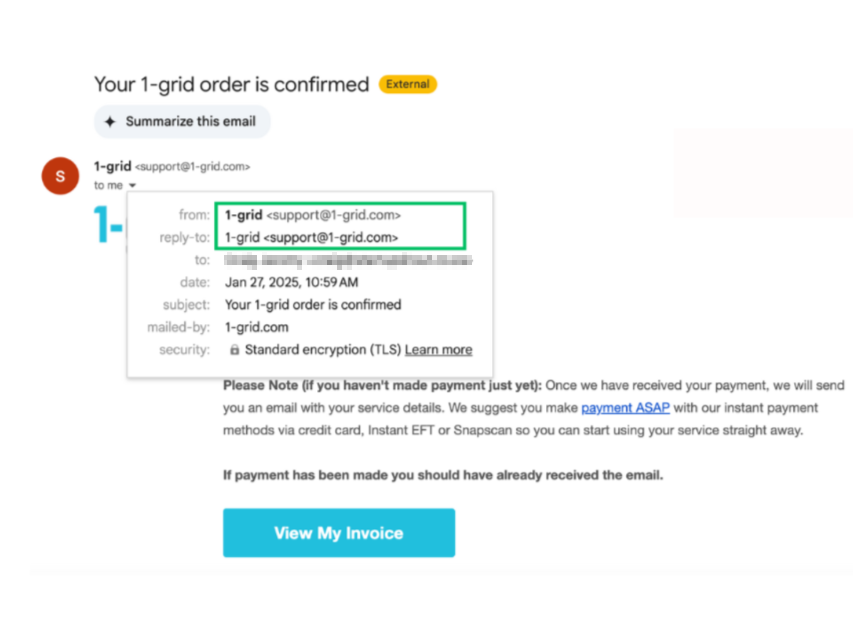
The sender’s email address is often the first clue that something is off. Phishing emails frequently use domain mismatches, subtle typos, or look-alike domains designed to deceive.
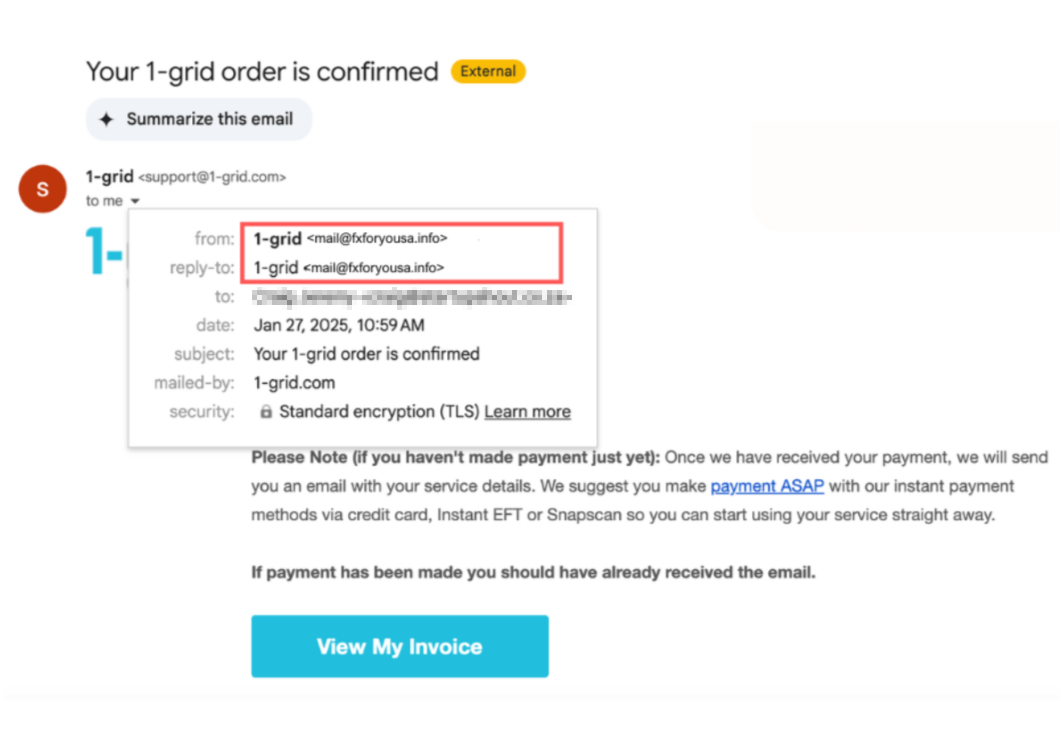
For example, an email from “[email protected]” or “[email protected]” might look legitimate at a glance but are not from 1-grid’s official domain. Genuine 1-grid communication always comes from “@1-grid.com”.
2. Poor Grammar, Spelling Mistakes, and Formatting Oddities
Professional companies have communication standards, so frequent spelling errors, poor grammar, or strange sentence structures are red flags. Phishing emails are often mass-produced and translated from other languages, resulting in unnatural phrasing or awkward punctuation.
If an email that claims to be from a well-known South African business or service provider contains noticeable typos or inconsistent branding, treat it as suspicious. Legitimate organisations rarely make such mistakes in official correspondence.
3. Urgency, Threats, or Pressure to Act Immediately
Scammers rely on emotional triggers to push people into quick action. Phrases such as “Your account will be suspended”, “Final warning”, or “Immediate payment required” are classic signs of a phishing attempt.
The goal is to create panic and make you respond before thinking.
In South Africa, phishing campaigns often target small businesses with urgent payment requests or fake invoices related to domain renewals, SARS refunds, or courier deliveries.
Always pause and verify the message through official channels rather than reacting on impulse.
4. Unexpected Attachments or Links
Phishing emails frequently contain attachments or links that appear harmless but lead to malicious sites or download malware. Always hover your cursor over a link to preview the actual URL before clicking. If the address looks strange or does not match the company’s official website, do not open it.
In many South African cases, attackers have used fake “Proof of Payment” attachments or links that mimic legitimate banking pages. If you were not expecting an attachment or link, verify with the sender before opening anything.
5. Requests for Sensitive Information
Legitimate organisations will never ask you to share passwords, banking details, or personal information via email. If an email requests such data, it is almost certainly a phishing attempt. These scams often use convincing language like “verify your account” or “confirm your details” to appear credible.
Phishers in South Africa have been known to impersonate financial institutions, mobile providers, and even government departments to gather personal data for identity theft or financial fraud. Always log in directly through the company’s official website instead of using links in an email.
6. Generic Greetings or Mismatched Branding
A common giveaway is when the email uses a generic greeting such as “Dear Customer” instead of addressing you by name. Inconsistent or poor-quality branding, distorted logos, or unusual colour schemes are also signs of a fake. These details suggest the sender does not have access to official communication templates.
For example, a phishing email claiming to be from a South African courier company might have a blurry logo or outdated design. Compare it to a genuine email from the same company to spot discrepancies quickly.
7. Suspicious or Unusual Context
Sometimes an email simply feels “off”. You might receive an invoice for a service you never ordered or an email from a senior colleague requesting gift cards or urgent payments.
Context is key. If it does not make sense, it probably is not real.
In South Africa, phishing scams often reference local institutions, events, or transactions to sound believable, such as municipal bills or vehicle licence renewals. Always confirm directly with the person or organisation through verified contact details before responding.
Recent Phishing Email Examples from South Africa
Below are two examples of phishing scams that circulated in South Africa, showing how convincing these emails can look and the red flags that give them away.
Example 1: Gripper / Ganedhi invoice redirection scam
A longstanding supplier–client relationship existed between Gripper & Company (Pty) Ltd and Ganedhi Trading Enterprises CC. In 2021, Gripper delivered goods (valves) and issued invoices with its known Standard Bank account details.
Later, Ganedhi received an email that appeared to come from Gripper’s managing director (“Max Hafen”) saying that the banking details had changed and that the new account was with Absa Bank.
Ganedhi paid into that new Absa account. Later, Gripper asked for payment, and the fraud was uncovered: the payment had gone to a bank account controlled by the fraudster, not Gripper.
What the email looked like & red flags:
- The email address was “[email protected]” instead of “[email protected]” (a missing “p”); a subtle typo in the domain name.
- It asked Ganedhi to change longstanding banking instructions, which is unusual for mature business relationships.
- There was no independent verification (e.g. phone call) to confirm the change before payment. Ganedhi simply trusted the email instructions.
How it was detected / how it could have been avoided:
- The mismatch in email domain (“griper” vs “gripper”) should have triggered suspicion.
- Had Ganedhi contacted Gripper via a known phone number (not via email) to confirm the bank change, the scam would likely have failed.
- When Gripper queried nonpayment, the inconsistency raised alarms and led to investigation.
Example 2: Motus / Movienet BEC (Business Email Compromise) in vehicle sale
In the legal case Movienet Networks (Pty) Ltd v Motus Ford Culemborg, a scenario unfolded where a deposit payment was diverted via email compromise. The buyer (Movienet) had agreed to purchase a vehicle and paid a deposit based on emailed banking instructions.
However, fraudsters intervened and changed the bank details in the communication, causing the payment to land in their account instead of the legitimate dealership’s account.
The Motus group challenged the return of the vehicle, legal actions followed, and forensic examination of emails and headers was performed to trace the compromises.
What the email looked like & red flags:
- The “reply-to” address differed from the “from” address; a genuine business would rarely send invoices with reply-to addresses on free domains (e.g. Gmail) or changing domains.
- The email header showed that the return path domain did not align with the “from” domain, hinting at spoofing.
- There was no DMARC policy in place on the implicated domains, so they were vulnerable to impersonation or spoofing.
How it was detected / how it could have been avoided:
- Forensic investigation of email headers and authentication (SPF, DMARC) flagged anomalies.
- If Movienet had verified the bank account change by telephone or another trusted channel, the interception likely would have failed.
How to Avoid Phishing: Proactive Measures
Avoiding phishing attacks requires a mix of awareness, technology, and proactive security measures. Even the most advanced email filters cannot catch every attempt, which is why businesses need both technical defences and well-informed employees.
Below are key strategies to help your organisation reduce the risk of falling victim to phishing.
- Train your team: employees are your first line of defence. Regular training sessions help staff recognise phishing emails and understand what to do if they receive one. Use real-world examples, such as local scams, and provide refresher courses every few months to keep awareness high.
- Use email filters and security tools: implement spam filters, antivirus software, and endpoint protection to detect and block suspicious emails before they reach users. These tools analyse sender behaviour, attachments, and links for known phishing indicators.
- Secure your domain: protect your business domain using SPF, DKIM, and DMARC authentication protocols. These tools verify that emails claiming to come from your company are legitimate, reducing the risk of domain spoofing. Also, consider secure DNS practices to prevent redirection to fraudulent websites.
- Enable multi-factor authentication (MFA): MFA adds a second layer of protection, such as a verification code or biometric check, even if an attacker steals a password. This extra step can stop most phishing-related breaches.
- Use backup and SSL certificate solutions: 1-grid’s Backup and SSL Certificate products provide essential layers of protection for your website and data. Automatic backups safeguard your business information against loss during cyberattacks or technical failures, while SSL Certificates encrypt communication between your website and users. This builds trust, protects customer information, and reduces the risk of data interception during phishing attempts.
How to Prevent Phishing Attacks: Company Policy & Culture
Building a strong company culture around cybersecurity is just as important as using technical safeguards. When employees feel empowered to question, verify, and report suspicious activity, the entire organisation becomes more resilient to phishing attacks.
Here are some effective ways to build that culture and strengthen defences through policy and practice.
- Set clear reporting policies: establish a simple, well-communicated process for reporting suspicious emails. Whether it’s through a dedicated inbox or an internal reporting button, employees should know exactly what to do when they spot something unusual. Quick reporting allows IT teams to investigate and prevent wider compromise.
- Promote a verification mindset: encourage employees to double-check any request involving money transfers, password changes, or confidential information. A quick phone call or face-to-face confirmation can prevent major losses. Reinforce that it is always better to verify than to assume.
- Run phishing simulations: conduct regular phishing simulations to test employee awareness in real-world conditions. These exercises help identify weak points and provide a safe way for staff to learn from mistakes. Regular “phish tests” build vigilance and turn cybersecurity into a shared responsibility across the organisation.
What To Do If You Think You’ve Received a Phishing Email
Receiving a phishing email can be alarming. Follow these clear steps to protect yourself and your business.
- Do not reply: never engage with the sender or provide any information.
- Do not click links or open attachments: these may install malware or lead to fake payment pages.
- Report internally: forward the email to your IT or security team using the organisation’s reporting channel and mark it for prompt investigation.
- Notify authorities: if the email involves fraud or financial loss, report it to the South African Police Service (SAPS) and South African Fraud Prevention Services. Also notify your bank if payment information was exposed.
- Change passwords immediately: if credentials may be compromised, change your passwords as soon as possible. Be sure to use strong unique passwords and enable multi factor authentication across affected accounts.
- Check accounts and log: review bank statements, transaction histories and account access logs for unauthorised activity and raise disputes where necessary.
If you are unsure whether an email is genuine, feel free to contact us at 1-grid for verification and assistance. We are here to help keep your business secure.