
Managing email accounts in your cPanel (your Hosting Control Panel) allows you to add or remove mailboxes without needing a support ticket. This guide will show you how you can safely and effectively create or delete an email account via cPanel for your email hosting with 1-grid.

- What is an Email Account in cPanel?
- When to Create vs When to Delete
- What Deletion Means and the Risks
- Quotas, Passwords and Permissions
- How to Create an Email Account in cPanel
- How to Delete an Email Account in cPanel
- Configure or Reconfigure Your Email Client After Creation/Deletion
- Best Practices and Maintaining Email Hygiene
- Troubleshooting Common cPanel Email Account Issues
- FAQs
- Additional Resources
What is an Email Account in cPanel?
An email account (like [email protected]) stores messages for your domain under your hosting package. cPanel offers built-in tools to create, manage, and delete these accounts, including quotas, passwords, and mailbox controls.
When to Create vs When to Delete
It is easy to create or delete an email account via cPanel for your hosting with us, so it is important to understand when to do one or the other.
- Create when you need a new user email, alias, departmental address, or temporary mailbox.
- Delete when an email account is no longer needed, is compromised, or unused.
IMPORTANT: Be cautious when deleting, as this will permanently remove all email data for that mailbox. Ensure you have backed up any necessary files before proceeding, if required.
What Deletion Means and the Risks
- Deleting removes all existing email content for that account; backup first if needed.
- Forwarders or aliases tied to that address may break.
- If someone still has that address configured in their client, they may get bounce errors or errors sending.
Quotas, Passwords and Permissions
- Mailboxes can have storage quotas. It is important to note that when exceeded, you won’t receive new mail.
- Use strong, unique passwords and change them periodically.
- Optionally, restrict mailbox features (Webmail only, no external access) via cPanel settings.
How to Create an Email Account in cPanel
1. Log in to your cPanel Admin Dashboard via your 1-grid Customer Zone.

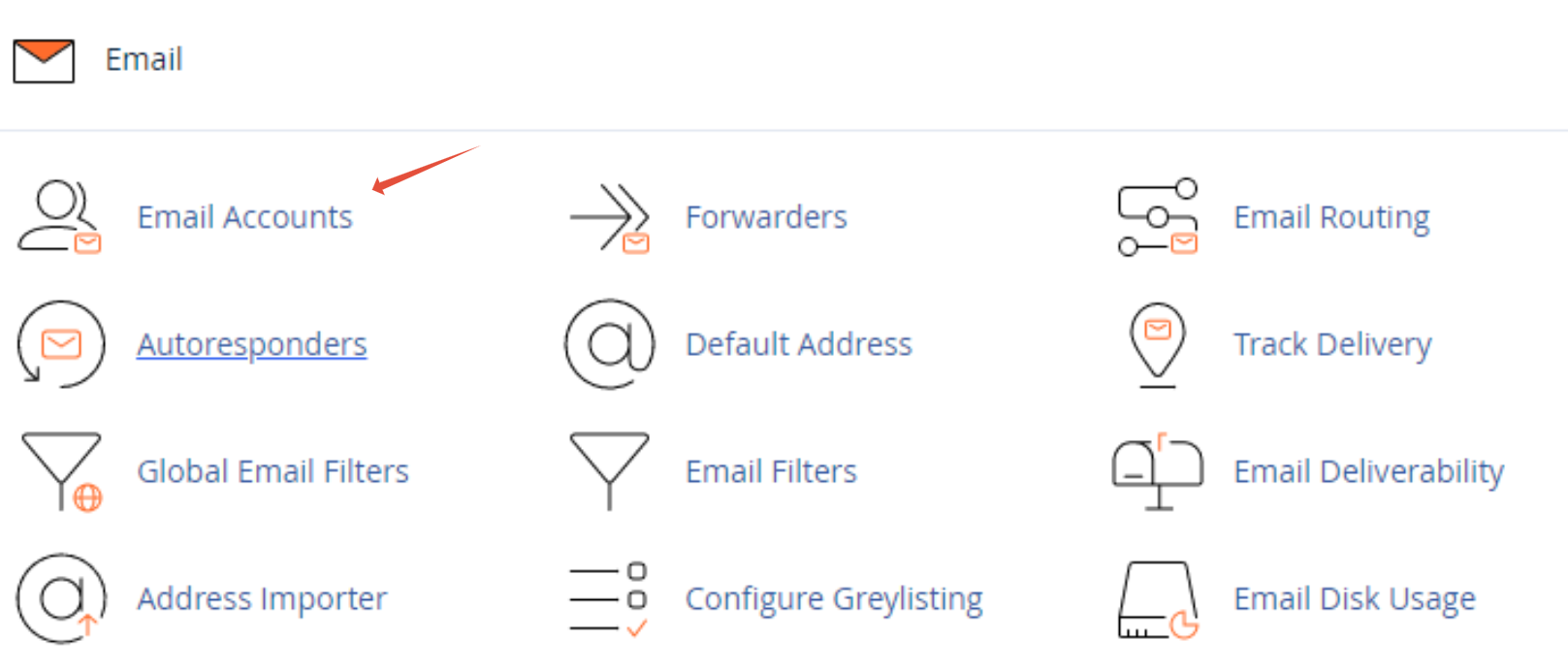
2. Find the Email section and click Email Accounts.
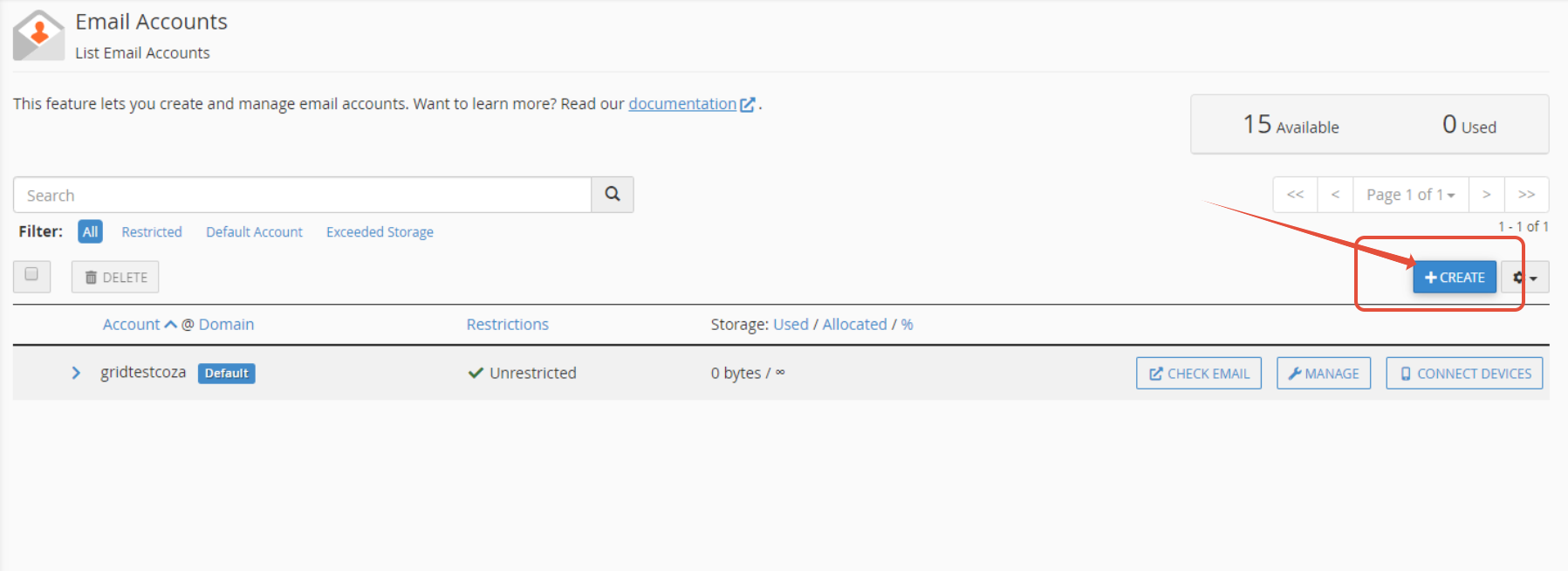
3. Click +Create (or “+ Add Email Account”).
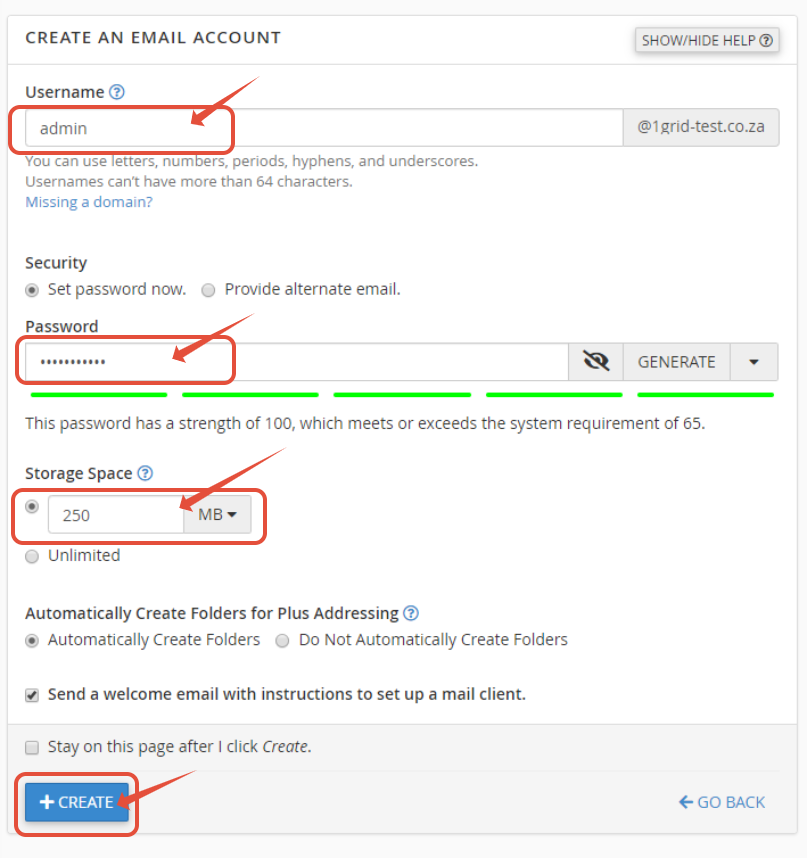
4. Fill in:
- Username (the part before the @)
- Domain (if you host multiple domains)
- Password (strong, unique)
- Mailbox Quota (set a size limit or unlimited)
5. Click on +Create or *Add Account.
6. (Optional) Set up Email Forwarders or Autoresponders if needed.
IMPORTANT: Note the mailbox settings, like the server, ports, and encryption, so that you can configure any email clients.
How to Delete an Email Account in cPanel
1. In cPanel, under Email → Email Accounts, locate the mailbox you want to remove.
2. Click Manage next to that account.

3. Scroll down to the bottom and click on Delete Email Account. *Remember, this will erase all stored mail for that account.
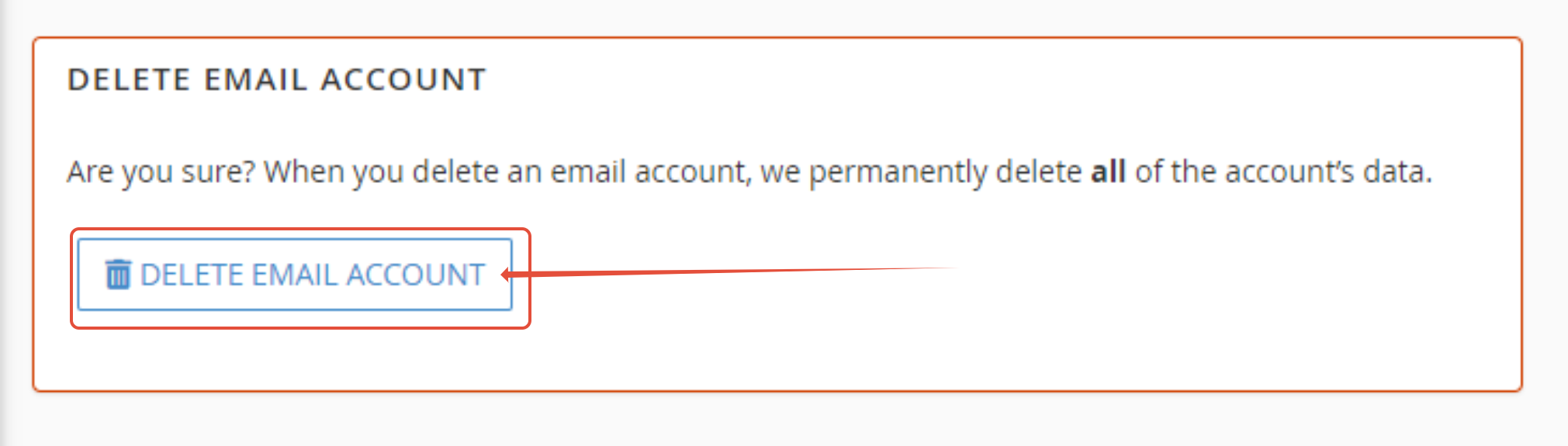
5. You will be prompted with a “You’re about…”. Confirm deletion by clicking on Delete.
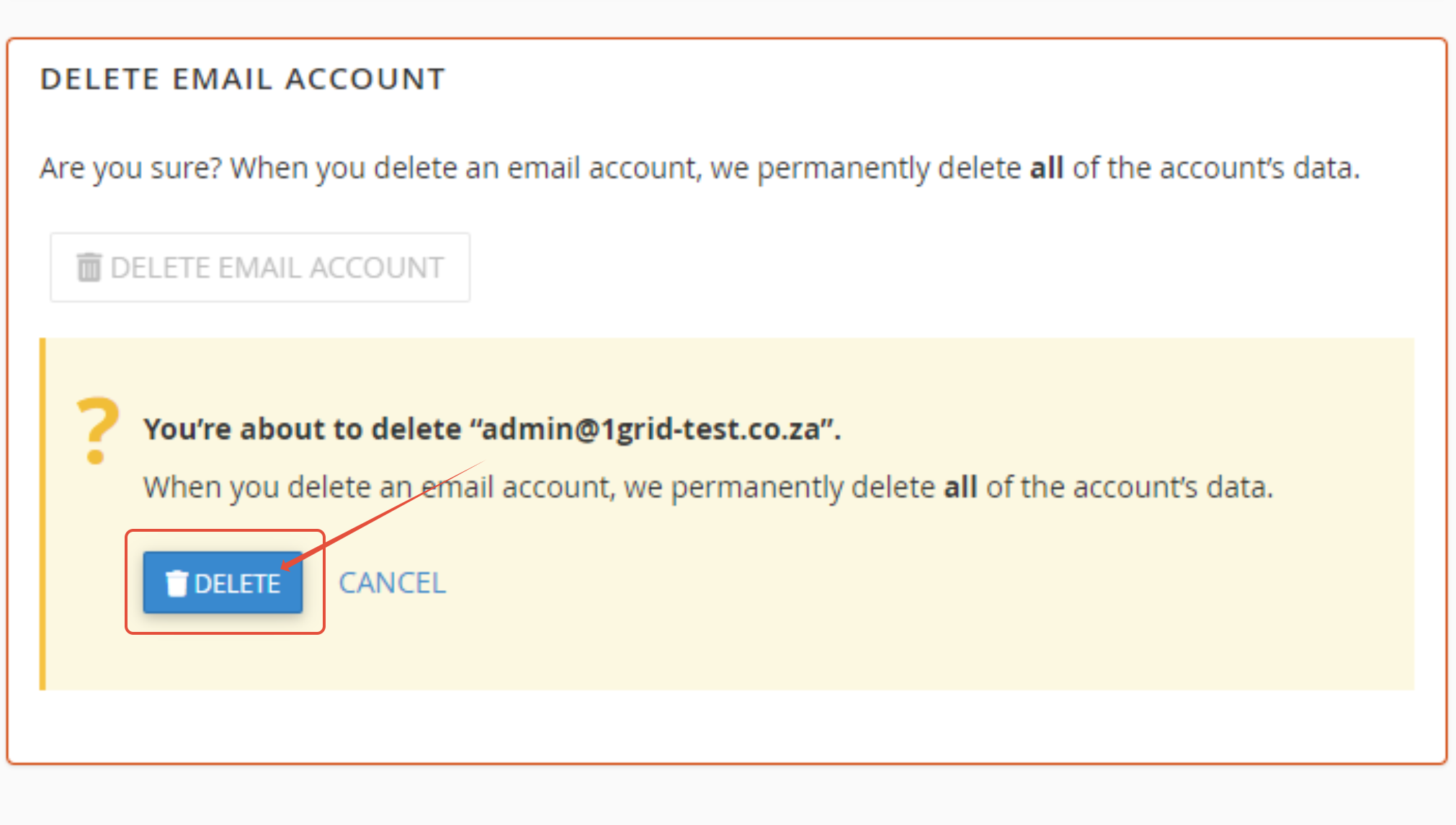
6. (Optional) If the mailbox was used for forwarding or catch-all, adjust those settings by deleting the existing forwarders or creating new ones to a different email address.
IMPORTANT: Inform any user using that mailbox of the deletion to avoid confusion.
Configure or Reconfigure Your Email Client After Creation/Deletion
Once created, you often need to configure Outlook, mobile, or Webmail to access the account. Use the correct server settings, ports, and security details.
You can get set up right away by following our guide: Settings to Configure Your 1-grid Email Accounts Across Devices.
If you have deleted an account via cPanel, be sure to take the necessary steps for the mail client to ensure that these are removed/reconfigured, as needed.
Best Practices and Maintaining Email Hygiene
- Clean up unused mailboxes regularly.
- Use aliases or group addresses rather than multiple full mailboxes.
- Monitor quotas to prevent interruption.
- Enforce strong passwords and periodically audit accounts.
- Document who manages which mailbox to avoid orphaned accounts.
Troubleshooting Common cPanel Email Account Issues
Error “username already exists”
This means that you might have created a mailbox earlier; review, delete or reuse it.
Login Failed After Creation
Wait a few minutes for synchronisation, or try to re-enter the password.
Mailbox Exceeds Quota
Increase the quota or archive older mail. This may also require you to purchase a larger Hosting package.
Client Can’t Connect
Missing Domain in the Drop-Down
Ensure that your domain is correctly added for hosting before creating the mailbox.
FAQs
Will creating a mailbox automatically configure it for Outlook/mobile?
No, after creation, you’ll need to set it up in your email client using the correct server settings.
What happens to stored emails when I delete the mailbox?
All data stored in that mailbox is deleted permanently. This is why it is recommended to back up messages before deleting them if needed.
Can I change the email password later?
Yes, in cPanel, under Email Accounts, use “Change Password” without needing to delete the mailbox.
Can I set the email quota to “unlimited”?
Yes, but still monitor the storage usage as very large mailboxes can slow performance or exceed your hosting plan limits.
Can I create catch-all or alias addresses instead of full mailboxes?
Yes, cPanel supports Email Forwarders and Aliases, which allow mail routing without a full mailbox.
If I delete an account, can I recreate it and still get old emails?
Only if you have a backup of the mailbox data (PST/backup), because the server won’t retain deleted content after deletion.
Additional Resources
cPanel FAQs
How to Log In to cPanel via Your 1-grid Customer Zone
Settings to Configure Your 1-grid Email Accounts Across Devices
How to Set Up Email on Android for Your 1-grid Email Accounts
Setting Up Email in Outlook via Windows Control Panel
How to Change an Email Account Password in cPanel
Troubleshooting Steps for Email
Email Error Messages: What Do They Mean and How to Fix Them
Top 10 Common Email Issues and How to Resolve Them
How to Import PST Contacts to Office 365
How to Import a PST File into Outlook
Restoring Emails in Outlook Using a .pst File
How to Repair Your Outlook (PST/OST) Data File
What Is Email Spoofing? How It Works and How to Protect Yourself
How to Spot a Scam Email
Email Headers FAQs
Email FAQs
How to Enable DKIM and SPF on Your Mail Domain
Why SSL? The Purpose of Using SSL Certificates
What is a Domain Name Server (DNS)?
How to Update Your Domain’s Nameservers at 1-grid
Top 10 Common cPanel / Control Panel Issues
MailChannels FAQs
SpamTitan FAQs
Need Additional Support?
We’re Here to Help:
Creating or deleting an email account via cPanel doesn’t have to feel like a challenge with this easy-to-use guide. Stuck? Contact our Support Team for clarity and guidance (https://1grid.co.za/contact-us/). We’re ready to see how we can help!